Every InDesign user eventually encounters the same problem.
The design is finished.
The typography looks right.
The images are positioned perfectly.
Then the final copy arrives—and it does not fit.
Perhaps a paragraph runs three lines beyond its text frame. A product description is considerably longer than the others. A headline wraps onto an unwanted third line. A caption takes up twice as much space as expected.
Traditionally, designers have solved these problems by changing the layout, reducing type size, adjusting tracking, enlarging text frames, or asking an editor to shorten the copy.
AI introduces another option:
change the text instead of changing the design.
Generative AI can help rewrite and shorten copy while attempting to preserve its meaning, tone, important facts, and terminology.
For Adobe InDesign users, this is potentially one of the most practical applications of AI-assisted text editing because it addresses a problem that occurs constantly in professional publishing: copy fitting.
This guide explains how to use AI to rewrite and shorten text for Adobe InDesign layouts, how to write better shortening prompts, how to protect important information, and how to decide when editing the copy is preferable to changing the typography.
Why Text Length Matters in Adobe InDesign
Writing applications generally treat text as information.
InDesign also treats text as geometry.
Every piece of copy occupies physical space determined by factors such as:
- font family;
- font size;
- font width;
- tracking;
- kerning;
- leading;
- paragraph spacing;
- column width;
- text-frame dimensions;
- hyphenation;
- language;
- paragraph styles.
That means two paragraphs containing the same number of words can occupy different amounts of space.
For a publication designer, the question is therefore not simply:
Is the copy well written?
It is also:
Does the copy fit?
What Is Copy Fitting?
Copy fitting is the process of making editorial content fit the available layout space while maintaining readability, meaning, and design quality.
Suppose a magazine layout provides room for approximately 250 words.
The writer submits 310 words.
Something has to change.
You could:
- increase the available space;
- reduce typography;
- alter spacing;
- change the layout;
- edit the copy.
AI makes option five considerably faster.
The Problem with Solving Everything Through Typography
When text does not fit, designers sometimes immediately reduce the font size.
For example:
10 pt → 9.5 pt → 9 pt → 8.5 pt
Eventually, the copy fits.
But the design may become worse.
You can lose:
- readability;
- consistency;
- hierarchy;
- accessibility;
- visual balance.
If every other page uses 10-point body copy, reducing one page to 8.5 points simply because the writer submitted too much text may not be the best solution.
Sometimes the copy should change instead.
AI Adds a New Copy-Fitting Option
Consider an overset paragraph.
Instead of changing the design, you can ask AI:
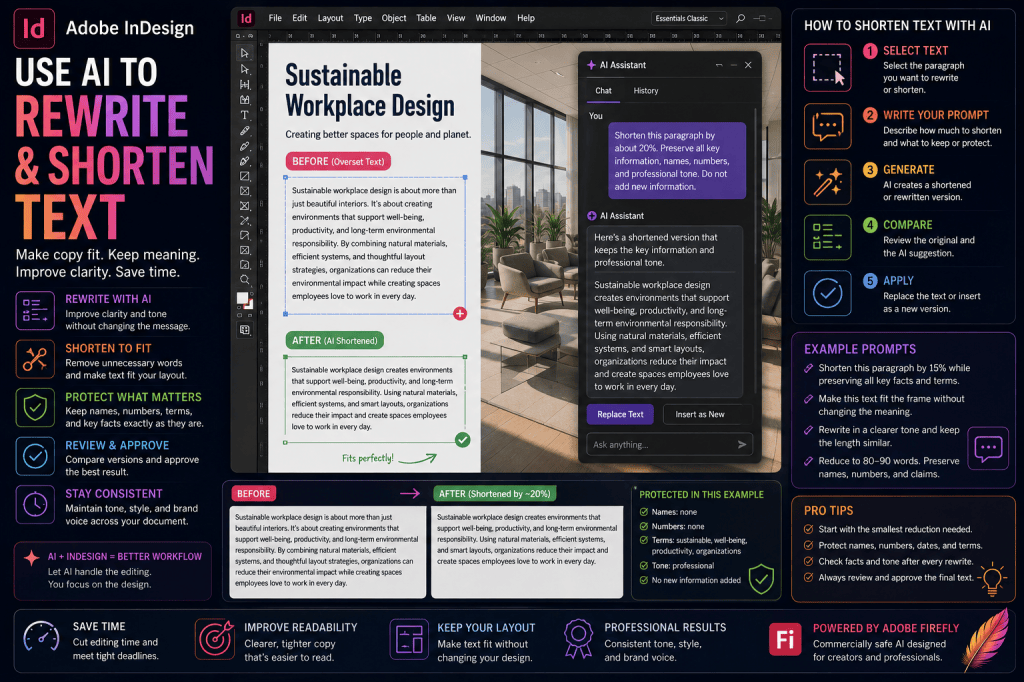
Shorten this paragraph by approximately 15% while preserving all important facts and the original tone.
The AI produces a shorter alternative.
You review it.
If the meaning remains correct, you place the revision into the text frame.
This creates a new workflow:
Overset text
↓
Determine required reduction
↓
AI shortening
↓
Human review
↓
Replace copy
↓
Check fit
That can be much faster than repeatedly adjusting the layout.
What Is Overset Text in InDesign?
Overset text occurs when a text frame contains more text than it can display.
InDesign indicates this with the familiar red plus sign in the text frame’s out port.
Some of the story exists beyond the visible frame.
Overset text can happen because:
- too much copy was supplied;
- the frame was resized;
- font size increased;
- a different font was substituted;
- text wrap changed;
- paragraph spacing changed;
- linked frames were removed;
- translation increased copy length.
AI can help with some of these situations—but not all of them.
First Determine Why the Text Is Overset
Do not immediately ask AI to shorten the text.
First diagnose the problem.
Check:
- Was the text frame accidentally resized?
- Is the correct paragraph style applied?
- Is the correct font installed?
- Has font substitution occurred?
- Is text wrap unexpectedly affecting the frame?
- Has leading changed?
- Has tracking changed?
- Is there an unwanted paragraph break?
- Is the story supposed to continue into another frame?
If the overset is caused by a layout error, fix the layout.
If the copy is genuinely too long, then consider editing it.
When AI Shortening Makes Sense
AI-assisted shortening is particularly useful when:
- the design is already approved;
- typography should remain consistent;
- only a small reduction is required;
- the copy can be edited;
- the author or editor can review changes;
- important information can be clearly protected.
For example, if a paragraph needs to lose approximately two lines, rewriting may be preferable to changing the entire page.
When AI Shortening Does Not Make Sense
Avoid casually rewriting:
- legal disclaimers;
- contracts;
- quotations;
- regulatory text;
- safety instructions;
- financial disclosures;
- medical instructions;
- approved product claims.
In these cases, wording may need to remain exact.
Changing the layout may be safer.
The Basic AI Shortening Prompt
A simple prompt is:
Shorten this paragraph.
But that is not a very good professional instruction.
The AI does not know:
- how much shorter;
- what information matters;
- what terminology must remain;
- whether tone should change;
- whether it may add new wording.
A better prompt is:
Shorten this paragraph by approximately 20% while preserving the key message, facts, names, numbers, and professional tone. Do not add new information.
Now the AI has constraints.
The Best Prompt Formula for Shortening InDesign Copy
Use:
Action + target reduction + protected information + tone + restrictions
For example:
Shorten the selected paragraph by approximately 15%. Preserve all product names, numbers, dates, technical specifications, and approved claims. Maintain the professional tone and do not introduce new information.
This is considerably safer than:
Make it fit.
How Much Should You Shorten?
Do not automatically ask for a 50% reduction.
Estimate how much space you actually need.
If the paragraph is only one line too long, perhaps 5–10% is sufficient.
If it is three lines too long, perhaps 15–20% is required.
A useful approach is:
smallest necessary edit first.
The more aggressively AI condenses text, the greater the chance that important nuance disappears.
Example: 10% Reduction
Original:
Our new publishing platform provides designers, editors, and marketing teams with a centralized environment for creating, reviewing, approving, and distributing professional digital content across multiple channels.
Shortened:
Our publishing platform gives designers, editors, and marketing teams a centralized environment for creating, reviewing, approving, and distributing professional content across multiple channels.
The core message remains largely intact.
Example: 30% Reduction
A larger reduction requires more editorial judgment.
The AI may begin removing:
- qualifiers;
- examples;
- supporting explanations;
- contextual information.
Always compare the shortened version with the source.
Protect Names and Numbers
Numbers are especially vulnerable during AI rewriting.
Suppose the source says:
The Pro plan costs €49 per month and includes 250 GB of storage for up to 10 team members.
A careless rewrite might accidentally alter or omit one of those details.
Use:
Shorten this sentence while preserving €49 per month, 250 GB, and 10 team members exactly.
This tells the AI what cannot change.
Protect Product Names
Suppose your document mentions:
Adobe InDesign
Do not allow AI to casually replace it with:
- InDesign software;
- Adobe publishing software;
- Adobe’s design application.
Sometimes those alternatives are acceptable.
Sometimes the exact product name matters for branding, SEO, or legal reasons.
Prompt:
Keep the exact phrase “Adobe InDesign” unchanged.
Protect Technical Terminology
Technical copy often contains terms that should not be simplified.
For example:
Preserve the terms “ICC profile,” “CMYK,” “PDF/X-4,” and “preflight” exactly.
This prevents AI from replacing precise terminology with more generic language.
Protect Quotations
Do not ask AI to rewrite a direct quote and then continue presenting it as a quote.
If a quotation is too long:
- shorten surrounding copy;
- choose a shorter excerpt;
- redesign the pull quote;
- obtain editorial approval.
Quoted words should remain faithful to the source.
Rewrite Without Shortening
Sometimes the text fits but reads poorly.
AI can help improve clarity.
For example:
Rewrite this paragraph in clearer professional English while preserving approximately the same length and all factual information.
The phrase:
approximately the same length
is important for InDesign.
Otherwise, an AI rewrite could turn a 70-word paragraph into 120 words and create a new layout problem.
Rewrite to the Same Length
This is an underrated InDesign prompt.
Try:
Rewrite this paragraph for clarity while keeping the revised version within 5% of the original word count.
This allows editorial improvement without substantially affecting the page.
Rewrite to a Specific Word Count
For standardized layouts, specify a target.
For example:
Rewrite this product description to 80–90 words while preserving all technical specifications and key benefits.
This works particularly well for:
- catalogs;
- directories;
- product cards;
- employee profiles;
- case studies;
- destination descriptions.
Shorten a Headline
Headlines create a different problem.
The issue is often not word count.
It is line length.
Suppose your headline is:
How Artificial Intelligence Is Transforming Professional Publishing Workflows
It wraps onto four lines.
You could ask:
Create 10 shorter versions of this headline, each no more than six words, while preserving the idea of AI transforming publishing.
Possible alternatives might include:
How AI Is Transforming Publishing
AI Is Changing Publishing Workflows
The AI Publishing Revolution
You can then test each option in the actual layout.
Ask for Several Alternatives
Never assume the first rewrite is the best.
For headlines, captions, and marketing copy, ask for several options.
For example:
Generate five shorter versions of this headline. Keep each under 40 characters.
Now you can compare them visually in InDesign.
Characters Can Matter More Than Words
Consider:
AI Is Transforming Publishing
and:
AI Revolutionizes Global Communications
Both contain four words.
But their typographic widths differ substantially.
Word count alone does not determine fit.
This is why a future layout-aware AI system could be particularly useful: it could evaluate actual text width rather than simply counting words.
Shortening Captions
Captions often have strict space limits.
Prompt:
Reduce this caption to no more than 25 words. Preserve the person’s name, job title, location, and date exactly.
This gives AI both a target and protected information.
Shortening Pull Quotes
Pull quotes need visual impact.
A long quotation may dominate the page.
If the words are a direct quotation, do not rewrite them.
Instead, ask AI to identify a shorter excerpt:
Select the strongest sentence of no more than 18 words from this quotation. Do not alter the wording.
This preserves authenticity.
Shortening Introductions
Introductions and standfirsts often need tight control.
For example:
Rewrite this introduction to 40–45 words. Preserve the central argument and avoid repeating the headline.
This is useful for magazine layouts and feature pages.
Shortening Product Descriptions
Catalog production is one of the strongest use cases.
Imagine 100 products.
Description lengths range from:
- 50 words;
- 85 words;
- 130 words;
- 175 words.
But the layout allows approximately 90 words.
AI can help normalize them.
Prompt:
Rewrite this product description to 80–90 words. Preserve the exact product name, model number, specifications, dimensions, price, warranty, and approved claims. Do not add new features.
This is far safer than simply saying:
Make this 90 words.
Shortening Employee Profiles
Corporate reports often include profiles of employees or executives.
You might standardize them:
Rewrite this biography to approximately 120 words. Preserve job title, career dates, qualifications, company names, and achievements exactly.
This produces more consistent page layouts.
Shortening Case Studies
Case studies frequently need multiple versions.
You may have:
- 1,000-word web version;
- 400-word brochure version;
- 150-word sidebar version.
AI can help create condensed drafts.
For example:
Condense this case study to 150 words using only information from the source. Preserve the customer name, challenge, solution, and measurable results.
Human review remains essential.
Rewrite for Tone
Copy can fit perfectly and still have the wrong voice.
For example:
Rewrite this paragraph in a confident but approachable tone. Keep approximately the same length and do not change factual claims.
Possible tone instructions include:
- professional;
- conversational;
- authoritative;
- friendly;
- concise;
- premium;
- educational;
- technical;
- neutral.
Rewrite for Plain Language
Complex institutional writing can often be simplified.
For example:
Rewrite this paragraph in plain English for a general audience. Keep all required information and approximately the same length.
This can improve accessibility without substantially changing the layout.
Simplification Can Change Meaning
Be careful.
Suppose:
The service may be available subject to eligibility requirements and regional restrictions.
AI might simplify this to:
The service is available in selected regions.
That sounds clearer.
It may also remove the eligibility condition.
Always compare the meaning.
Shorten Without Changing Meaning
A useful instruction is:
Remove redundancy and unnecessary wording before removing substantive information.
This encourages the AI to look first for:
- repeated ideas;
- filler;
- unnecessary qualifiers;
- wordy constructions.
That is generally preferable to deleting important facts.
Example: Removing Redundancy
Original:
At this point in time, our company is currently developing a new and innovative AI-powered solution that is designed to help designers work more efficiently.
Possible revision:
Our company is developing an AI-powered solution to help designers work more efficiently.
Much shorter.
Very little meaning is lost.
This is where AI shortening can work extremely well.
Remove Filler Before Facts
Another useful prompt:
Shorten this paragraph by removing repetition, filler, and unnecessary modifiers first. Preserve all factual content.
This provides the model with an editorial priority.
Shorten Sentence by Sentence
For sensitive copy, do not necessarily rewrite the entire paragraph.
You can work incrementally.
For example:
Suggest a shorter version of this sentence without changing its meaning.
Then review each change.
This is slower but gives you more control.
AI Should Suggest Changes
For important documents, prefer:
Suggest a shorter version.
rather than:
Replace the text.
This keeps the human in the approval loop.
A strong workflow is:
Original
↓
AI suggestion
↓
Human comparison
↓
Editorial approval
↓
Replacement
Use Version Control
Keep the original text somewhere.
Depending on your workflow, this could involve:
- Track Changes;
- comments;
- duplicate text frames;
- linked source documents;
- content-management systems;
- versioned files.
You should always be able to answer:
What did the original copy say?
Check Facts After Every Rewrite
Do not only check grammar.
Check:
- names;
- dates;
- prices;
- percentages;
- measurements;
- product specifications;
- locations;
- technical terminology;
- claims;
- qualifications.
AI can produce beautifully written incorrect text.
Check Whether the Tone Became Stronger
AI sometimes makes copy more assertive.
Original:
The feature can help improve productivity.
Rewrite:
The feature dramatically improves productivity.
Those are not equivalent claims.
The rewrite has introduced:
- certainty;
- magnitude;
- a stronger marketing claim.
Always review claim strength.
Avoid AI Hallucinations
A shortening task should ideally not require new information.
Use instructions such as:
Use only information contained in the original text.
Do not add examples.
Do not add statistics.
Do not infer missing facts.
These constraints are valuable.
Shortening Translated Copy
Translation frequently causes copy-fitting problems.
Suppose the English paragraph fits perfectly.
The German translation may be substantially longer.
Instead of reducing type size, you might ask:
Shorten this German translation by approximately 10% while preserving all factual information, product names, and technical terminology.
A fluent speaker should review the result.
Maintain Terminology Across Languages
For multilingual publications, create a protected terminology list.
For example:
- product names;
- feature names;
- legal phrases;
- industry terminology;
- branded terms.
Tell the AI not to alter them.
This helps maintain consistency.
AI Copy Fitting for Data Merge
Imagine an InDesign Data Merge workflow with hundreds of records.
One field contains product descriptions.
Some fit.
Others overflow.
AI could potentially normalize the source content before the merge.
For example:
Normalize every product description to 60–75 words while preserving all values in the specification fields.
This could substantially reduce manual cleanup.
AI Copy Fitting for Catalogs
Catalogs benefit particularly from predictable content lengths.
A future automated workflow might:
- import product data;
- identify overset descriptions;
- calculate required reduction;
- generate shorter alternatives;
- flag them for review;
- update approved text;
- regenerate the pages.
That could transform high-volume publishing.
AI Copy Fitting for Magazines
Magazine designers frequently receive copy late.
AI can help with:
- standfirsts;
- captions;
- sidebars;
- headlines;
- decks;
- summaries;
- short biographies.
However, substantive article editing should still involve the editor or author.
AI Copy Fitting for Annual Reports
Annual reports often contain strict layouts and large amounts of text.
Potential uses include:
- shortening section introductions;
- condensing executive biographies;
- creating short chart explanations;
- standardizing callouts.
Do not casually rewrite regulated financial disclosures.
AI Copy Fitting for Brochures
Brochure copy is particularly suitable because messaging often needs to be concise.
AI can help turn:
long explanation
into:
short benefit statement
For example:
Condense this 80-word feature description into a 25-word benefit statement without introducing new claims.
This can be highly useful during layout production.
AI Copy Fitting for Advertisements
Advertisements require extremely concise language.
You could ask:
Reduce this paragraph to one sentence of no more than 18 words while preserving the primary benefit.
Or:
Generate five CTA alternatives of no more than three words.
The designer can then test the alternatives visually.
When to Edit Copy vs Change Typography
This is an important design decision.
Edit the copy when:
- the copy contains redundancy;
- only a modest reduction is required;
- the text is editable;
- typography should remain consistent;
- the layout is approved.
Change the typography/layout when:
- wording must remain exact;
- large amounts of content would need removal;
- the information is legally or technically sensitive;
- shortening damages meaning;
- the page genuinely needs more space.
AI does not eliminate this judgment.
Never Shrink Text Indefinitely
If a page requires dramatically smaller type than the rest of the publication, something is probably wrong.
Consistency and readability matter more than forcing every word into a fixed frame.
Sometimes the correct solution is:
add another page.
How AI Could Become Layout-Aware
Current AI rewriting often begins with text.
But the real opportunity for InDesign is deeper integration.
Imagine selecting an overset frame and asking:
Fix the overset.
The AI could potentially analyze:
- current text length;
- overset amount;
- available lines;
- paragraph style;
- font;
- frame dimensions;
- protected terms.
It could calculate that approximately 37 characters need to be removed.
Then it could suggest the smallest possible edit.
That is far more useful than generic text summarization.
AI Could Optimize for Actual Text Width
Word count is only an approximation.
A future AI assistant could understand actual typographic width.
For example:
Suggest five headline alternatives that fit within this frame using the current paragraph style.
It could test each candidate against the actual layout.
That would combine:
language generation + typography + geometry.
This is where InDesign has a unique opportunity.
AI Could Find Overset Text Across a Document
Imagine asking:
Find every overset text frame in this document.
Then:
Suggest minimal copy reductions for each one.
The AI could potentially produce a review list:
Page 6 — 14 words overset
Page 17 — 2 lines overset
Page 24 — headline exceeds frame
Page 31 — caption overset
The designer or editor could approve each recommendation individually.
AI Could Enforce Copy-Length Rules
Publications often have editorial standards.
For example:
- headlines: maximum 50 characters;
- standfirsts: 35–45 words;
- captions: maximum 30 words;
- biographies: 100 words;
- product descriptions: 75 words.
An AI assistant could inspect the document and flag violations.
That turns AI into a production-quality assistant rather than merely a writing tool.
10 Useful AI Shortening Prompts for InDesign
1. General Reduction
Shorten this paragraph by approximately 15% while preserving all important information.
2. Overset Text
Shorten this paragraph only enough to remove the overset text. Preserve all names, numbers, dates, and technical terms.
3. Same-Length Rewrite
Rewrite this paragraph for clarity while keeping approximately the same length.
4. Product Description
Rewrite this product description to 80–90 words. Preserve all specifications, prices, and approved claims.
5. Headline
Generate five shorter headline alternatives under six words while preserving the central idea.
6. Caption
Reduce this caption to no more than 25 words while preserving names, locations, and dates.
7. Standfirst
Rewrite this standfirst to 35–40 words without repeating the headline.
8. Plain Language
Simplify this paragraph for a general audience while preserving all important information and approximately the same length.
9. Remove Redundancy
Shorten this text by removing repetition, filler, and unnecessary modifiers before removing substantive information.
10. Strict Factual Rewrite
Reduce this text by 20% using only information from the original. Do not add facts, examples, statistics, or claims.
A Professional AI Shortening Checklist
Before accepting AI-rewritten copy, verify:
- Does it fit?
- Is the meaning unchanged?
- Are all names correct?
- Are all numbers correct?
- Are dates preserved?
- Are technical terms intact?
- Are product names correct?
- Have any claims become stronger?
- Has important nuance disappeared?
- Has AI added information?
- Is the tone appropriate?
- Has the editor approved the revision?
The first question is about layout.
The remaining questions are about editorial integrity.
Both matter.
Adobe InDesign and AI-Assisted Copy Fitting
AI-assisted rewriting fits naturally into the broader evolution of InDesign.
Adobe is increasingly integrating AI and Firefly-powered capabilities into creative workflows.
For page designers, the most valuable AI functions may ultimately be those that understand the relationship between:
- content;
- typography;
- images;
- frames;
- page geometry;
- and publication rules.
Copy fitting is a perfect example.
The problem is not simply that the text is too long.
The problem is that:
this text is too long for this specific design.
That context changes what a useful AI assistant should do.
Explore Adobe InDesign
Adobe InDesign provides professional tools for typography, page layout, magazines, books, brochures, catalogs, reports, and digital publications, alongside Adobe’s evolving AI-assisted creative workflows.
→ View Adobe InDesign plans and current offers
Frequently Asked Questions
Can AI shorten text for Adobe InDesign?
Yes. Generative AI can create shorter versions of copy that can then be reviewed and used in an InDesign document.
Can AI fix overset text?
AI can help shorten copy causing overset text, but you should first determine whether the overset is actually caused by excessive copy rather than a layout or formatting problem.
Can AI automatically make text fit a frame?
AI-assisted workflows can help adapt copy length, while exact automatic text-fitting capabilities depend on the current tools and InDesign version being used.
Should I reduce font size or shorten the copy?
It depends on the document. If typography should remain consistent and the copy can be edited safely, shortening may be preferable.
How much should I ask AI to shorten text?
Use the smallest reduction necessary. Smaller edits generally preserve meaning better than aggressive summarization.
Can AI rewrite text without changing its length?
Yes. Ask the AI to keep approximately the same word count or within a defined percentage of the original length.
Can AI shorten headlines?
Yes. Request several alternatives with clear word-count or character-count limits and test them in the actual layout.
Can AI shorten direct quotations?
AI should not rewrite a quotation and present the changed wording as a direct quote. Instead, select a shorter verbatim excerpt where editorially appropriate.
Can AI shorten legal text?
Legal, contractual, regulatory, and other sensitive language should not be casually rewritten. Appropriate professional review is essential.
Can AI change facts while shortening text?
Yes. AI can accidentally remove conditions, alter numbers, strengthen claims, or change meaning. Always compare the result with the source.
The Most Important Rule
When using AI for InDesign copy fitting, remember:
The goal is not to make the text as short as possible.
The goal is to make it:
only as short as necessary.
If two lines need to disappear, do not remove half the paragraph.
If a headline needs to lose one word, do not completely rewrite the message.
The best AI-assisted copy fitting is often almost invisible.
The reader should not think:
This text was shortened by AI.
They should simply see a well-written page where everything fits naturally.
Final Thoughts
AI-assisted rewriting and shortening could become one of the most useful everyday AI workflows for Adobe InDesign users.
It addresses a problem designers encounter constantly:
too much copy for the available space.
Instead of immediately changing:
- font size;
- tracking;
- leading;
- frame dimensions;
- page structure;
you can consider whether the copy itself can be made more concise.
The strongest workflow is:
Diagnose the layout problem.
Determine the smallest required reduction.
Give AI precise constraints.
Protect important facts and terminology.
Review the suggested revision.
Test it in the layout.
Obtain editorial approval.
AI can accelerate the editing process.
But it should not decide which information is expendable.
That remains an editorial decision.
In professional publishing, the ideal outcome is not simply text that fits.
It is:
accurate text, clear text, readable text—and text that fits beautifully.
Try Adobe InDesign
Create professional magazines, books, brochures, catalogs, reports, and marketing materials with industry-standard page-layout and typography tools.
→ Get Adobe InDesign and view the latest Adobe offer
Continue the InDesign AI Series
Next:
Adobe InDesign AI Text Fit: Automatically Make Copy Fit Your Layout
Also explore:
- Adobe InDesign AI: The Complete Guide to AI Features and Workflows in 2026
- Adobe InDesign AI Assistant: A Complete Guide
- How to Use InDesign AI Assistant to Edit Documents with Natural-Language Prompts
- 50 Useful Prompts for Adobe InDesign AI Assistant
- Adobe InDesign AI Text Features: Generate, Rewrite, Shorten, and Refine Copy
- Adobe InDesign Generative Expand: How to Extend Images with AI