One of the oldest problems in professional page design is also one of the simplest:
The copy does not fit.
You have created the page in Adobe InDesign. The typography is carefully balanced. Paragraph styles are correct. Images are positioned. Margins and columns follow the publication grid.
Then the final text arrives.
It is too long.
A paragraph runs beyond its frame. A product description creates overset text. A headline wraps onto an unwanted line. A caption pushes other content down the page.
Traditionally, designers solve these problems manually by editing copy, changing typography, resizing frames, adjusting spacing, or restructuring the page.
AI-assisted Text Fit introduces a different idea:
Instead of changing the layout to accommodate the copy, intelligently adapt the copy to the available space.
This could become one of the most practical applications of AI in Adobe InDesign because it connects generative language technology directly to page geometry.
In this guide, we’ll explore how AI Text Fit works conceptually, how it can help with overset text, where it fits into professional publishing workflows, and why designers should still maintain editorial control over every AI-generated change.
What Is AI Text Fit in Adobe InDesign?
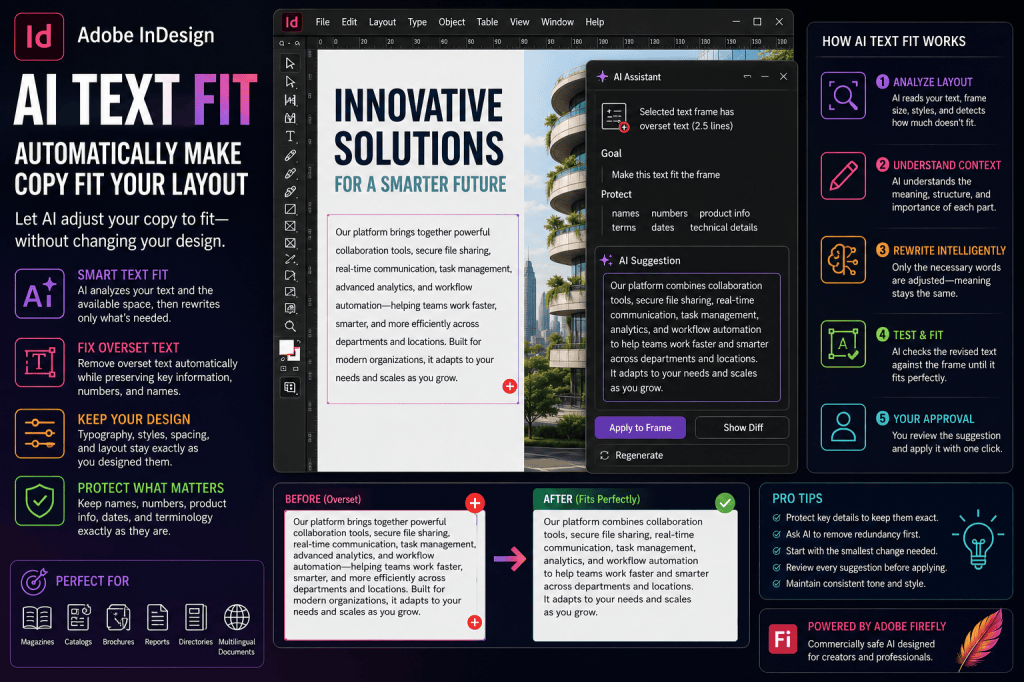
AI Text Fit can be understood as an AI-assisted workflow for adapting written content to the available space in an InDesign layout.
The objective is straightforward:
Original copy
↓
Available text-frame space
↓
AI analyzes required reduction
↓
Copy is rewritten or condensed
↓
Revised copy fits
Traditional generative AI knows how to shorten text.
An InDesign-oriented AI workflow can potentially go further by considering the actual layout constraints.
That distinction is important.
Text Shortening vs Text Fitting
These two concepts sound similar, but they are not identical.
If you tell an AI writing tool:
Shorten this paragraph by 20%.
you have already decided how much shorter it needs to be.
With intelligent Text Fit, the application could potentially determine the required reduction itself.
For example:
Make this paragraph fit the current frame.
The system could analyze how much copy is overset and generate a revision targeted specifically at the available space.
The objective is therefore not:
make this shorter.
It is:
make this fit.
Why Text Fit Is Particularly Relevant to InDesign
InDesign already understands the physical properties of text.
It knows:
- text-frame width;
- text-frame height;
- column count;
- font;
- font size;
- leading;
- tracking;
- paragraph styles;
- indents;
- paragraph spacing;
- hyphenation;
- text wrap;
- overset status.
That provides context a standalone AI writing application normally does not have.
Imagine combining this layout information with generative AI.
The AI could potentially understand that:
This paragraph needs to lose approximately 18 words to fit without changing its paragraph style.
That is a much more precise publishing workflow.
The Traditional Ways to Make Text Fit
Before considering AI, it is useful to understand the existing options.
When copy is too long, an InDesign designer might:
- enlarge the text frame;
- reduce font size;
- reduce leading;
- tighten tracking;
- reduce paragraph spacing;
- change column width;
- change text wrap;
- add another page;
- continue the story in another frame;
- manually edit the copy.
Every solution affects the document differently.
Why Reducing Font Size Is Often the Wrong First Choice
Suppose your publication uses:
10 pt body copy / 14 pt leading
throughout the entire document.
One page contains too much text.
You reduce that page to:
9 pt / 12 pt
The overset disappears.
But now one page has different typography.
You may have solved the technical problem while creating a design problem.
AI Text Fit offers the possibility of preserving the typography and modifying only the amount of copy.
Why Tracking Should Not Become a Rescue Tool
Designers can sometimes fit additional text by tightening tracking.
For example:
0 → -10 → -20 → -30
A small adjustment may be acceptable.
Aggressive tracking changes can make paragraphs look visibly compressed and reduce readability.
Text Fit could provide a better alternative when the real problem is unnecessary copy.
When Adding Another Page Is Better
AI should not be used to force every article into an arbitrary space.
Suppose a 1,500-word article has been placed into a layout designed for 800 words.
The problem is not copy fitting.
The problem is the editorial plan.
Trying to make AI remove nearly half the article could destroy its value.
Sometimes the correct answer is:
give the content more space.
How AI Text Fit Could Work
A sophisticated Text Fit workflow could follow several stages.
Step 1 — Detect the Problem
InDesign identifies overset text or a selected frame requiring adjustment.
For example:
2.5 lines of text are overset.
Step 2 — Analyze Available Space
The application knows:
- frame dimensions;
- paragraph style;
- font metrics;
- line breaks;
- current composition.
Step 3 — Estimate Required Reduction
Instead of arbitrarily shortening the entire story by 20%, AI determines the smallest useful change.
Perhaps only:
- 12 words;
- 70 characters;
- one sentence;
need to disappear.
Step 4 — Analyze the Copy
AI identifies:
- repetition;
- unnecessary modifiers;
- verbose phrases;
- redundant explanations;
- sentences that can be combined.
Step 5 — Protect Important Information
The workflow should preserve specified content such as:
- names;
- numbers;
- dates;
- prices;
- specifications;
- product names;
- quotations;
- technical terms.
Step 6 — Generate a Suggested Revision
AI creates a shorter version.
Step 7 — Test the Revision Against the Frame
The application recomposes the text.
If it still does not fit, another small adjustment can be suggested.
Step 8 — Present the Change for Approval
The designer or editor compares:
Original
versus
Suggested revision
before accepting the change.
This is the critical human-control step.
AI Text Fit Should Use the Smallest Necessary Change
This principle is fundamental.
Suppose a paragraph contains 180 words.
Only the final line is overset.
You probably do not need a 30% reduction.
Perhaps removing eight words is enough.
The ideal AI Text Fit system should therefore ask:
What is the minimum editorial change necessary to satisfy the layout constraint?
This is very different from general summarization.
Example: Overset Brochure Copy
Imagine a brochure containing this paragraph:
Our cloud-based collaboration platform provides organizations with a centralized environment where employees can communicate, share documents, coordinate projects, manage tasks, review progress, and collaborate securely with colleagues across departments and locations.
Only one line is overset.
AI might identify redundancy and suggest:
Our cloud collaboration platform gives organizations a centralized environment to communicate, share documents, manage projects and tasks, review progress, and collaborate securely across departments and locations.
The meaning remains similar.
The paragraph becomes shorter.
The typography remains unchanged.
That is the ideal use case.
Text Fit for Headlines
Body copy is not the only candidate.
Headlines also have strict geometric requirements.
Suppose your headline is:
How Artificial Intelligence Is Transforming the Modern Publishing Industry
The design allows two lines.
The headline occupies three.
An AI-assisted workflow could suggest:
- How AI Is Transforming Publishing
- How AI Is Changing Publishing
- AI and the Future of Publishing
- The AI Publishing Transformation
- How AI Reshapes Publishing
The designer can test the alternatives against the actual headline frame.
AI Text Fit Should Understand Character Width
This is where layout-aware AI becomes much more sophisticated.
Consider these two headlines:
AI Changes Modern Publishing
AI Transforms Global Communication
Both have four words.
But they do not necessarily occupy the same horizontal space.
Typography depends on glyph width.
A truly InDesign-aware Text Fit system could evaluate:
- actual font;
- actual font size;
- tracking;
- frame width;
- line breaks.
Instead of generating a headline with the correct number of words, it could generate one that actually fits the frame.
Text Fit for Captions
Captions are excellent candidates for AI-assisted fitting.
Suppose a caption frame supports approximately 30 words.
The supplied caption contains 47.
You could request:
Make this caption fit the current frame. Preserve the person’s name, job title, company, location, and date.
AI can remove less important wording while preserving essential metadata.
Text Fit for Standfirsts
Magazine and editorial layouts frequently use a short introduction below the headline.
A publication might specify:
35–45 words
for every standfirst.
AI could identify standfirsts outside this range and suggest revisions.
This creates consistency across the publication.
Text Fit for Pull Quotes
Pull quotes need to work visually.
A quotation that occupies eight lines may overwhelm the page.
AI can help identify a shorter verbatim excerpt.
The distinction is important.
For a direct quotation, use AI to:
select fewer original words
rather than:
rewrite the speaker’s words.
For example:
Find the strongest 15–20 word excerpt from this quotation. Preserve the wording exactly.
Text Fit for Product Catalogs
Catalog production could be one of the biggest beneficiaries.
Imagine 1,000 product records.
Every product card has room for:
- product name;
- price;
- specifications;
- 75-word description.
But incoming descriptions range from 40 to 180 words.
AI could potentially normalize them automatically.
For example:
Fit each description into the designated text frame while preserving all product names, model numbers, prices, specifications, dimensions, and approved claims.
The system could flag every modified record for human review.
AI Text Fit + Data Merge
This becomes even more interesting when combined with InDesign Data Merge.
A possible workflow:
Product database
↓
Data Merge
↓
InDesign pages generated
↓
Overset frames detected
↓
AI Text Fit suggestions generated
↓
Human approval
↓
Final catalog
Instead of manually fixing hundreds of overflow problems, editors could focus only on exceptions.
Text Fit for Directories
Directories often contain variable-length content:
- employee profiles;
- company descriptions;
- listings;
- addresses;
- service descriptions.
Standardized frames create predictable page structures.
AI Text Fit could normalize the narrative fields while leaving structured information untouched.
Text Fit for Annual Reports
Annual reports frequently have strict page budgets.
Potential applications include:
- executive biographies;
- section introductions;
- callout text;
- chart explanations;
- captions.
However, financial disclosures and regulated statements should not be casually rewritten.
Text Fit for Marketing Brochures
Marketing documents are particularly suitable because much of the copy is flexible.
AI could help turn:
long feature description
into:
short benefit statement
while respecting the layout.
For example:
Fit this product benefit into the existing text frame. Preserve the approved claim and product name. Do not introduce new claims.
Text Fit for Advertisements
Advertisements may have extremely tight constraints.
For example:
- headline: maximum two lines;
- supporting copy: 25 words;
- CTA: three words.
AI can quickly produce several variants that satisfy these constraints.
The designer can then choose the strongest visual and editorial combination.
Text Fit for Business Cards and Small Formats
Small-format designs make every character matter.
Examples include:
- business cards;
- labels;
- packaging;
- event badges;
- postcards;
- small advertisements.
AI could help shorten descriptions or titles while preserving essential information.
However, mandatory legal or product text should remain untouched.
Text Fit for Multilingual Documents
Translation creates major copy-fitting challenges.
A layout designed around English may not work identically in:
- German;
- Dutch;
- French;
- Spanish;
- Italian;
- Portuguese.
Some translations expand substantially.
An AI-assisted workflow could potentially adapt translated copy to the available frame.
For example:
Shorten this Dutch translation only enough to fit the existing text frame. Preserve all product names, numbers, technical terminology, and meaning.
A fluent reviewer should approve the result.
AI Text Fit Should Respect Language
The system should not simply translate and shorten mechanically.
Professional multilingual publishing requires awareness of:
- grammar;
- idiom;
- terminology;
- punctuation;
- cultural conventions;
- line-breaking rules.
AI assistance can speed production, but native-language review remains important.
Text Fit for Responsive Content
The same content may appear in multiple formats.
For example:
Print brochure: 120 words
Advertisement: 40 words
Sidebar: 75 words
Social graphic: 20 words
Instead of writing four versions manually, AI could create layout-specific variants from the approved source.
This creates an interesting concept:
one source → multiple fitted versions.
Preserve a Master Version
This is important.
Do not allow every layout to become a different uncontrolled version of the copy.
Maintain an approved master.
Then create derivatives:
Master copy
↓
Brochure version
Catalog version
Advertisement version
Social version
Each should be traceable back to the approved source.
What Information Should AI Never Remove?
Before fitting text, identify protected information.
Examples include:
- names;
- prices;
- dates;
- measurements;
- percentages;
- technical specifications;
- model numbers;
- URLs;
- legal requirements;
- approved claims;
- certification names.
A professional prompt should explicitly protect these elements.
Example Protected-Content Prompt
Make this product description fit the selected frame. Preserve the exact product name, model number, dimensions, price, warranty period, certification, and all numerical specifications. Remove repetition and nonessential wording first. Do not add new claims.
This gives AI a clear hierarchy.
AI Should Remove Redundancy First
When reducing text, the safest first targets are often:
- repeated information;
- filler phrases;
- unnecessary adjectives;
- wordy constructions;
- duplicated explanations.
For example:
Original:
At this point in time, we are currently working on the development of a completely new AI platform.
Shorter:
We are developing a new AI platform.
Very little information has been lost.
AI Should Not Remove Conditions Casually
Consider:
Customers may qualify for the discount if they purchase before September 30 and meet the eligibility requirements.
An aggressive AI rewrite might produce:
Customers receive a discount on purchases before September 30.
That changes the meaning.
The eligibility condition has disappeared.
This is why human review remains essential.
AI Text Fit and Legal Copy
Legal text is generally a poor candidate for automatic rewriting.
Examples include:
- disclaimers;
- terms and conditions;
- contracts;
- privacy statements;
- copyright notices;
- regulatory disclosures.
If the text does not fit, the safer solution is often changing the layout.
Approved legal wording should remain intact unless qualified reviewers approve changes.
AI Text Fit and Financial Content
Financial publishing requires similar caution.
Never casually condense:
- audited financial statements;
- risk disclosures;
- forward-looking statements;
- regulatory wording;
- accounting notes.
AI can help with less sensitive supporting copy, but factual and regulated content requires rigorous controls.
AI Text Fit and Medical Content
Medical and healthcare documents may contain wording where seemingly minor edits matter.
Do not automatically shorten:
- dosage information;
- contraindications;
- warnings;
- clinical instructions;
- regulatory statements.
Layout flexibility should take priority over uncontrolled rewriting.
AI Text Fit and Technical Documentation
Technical documents contain terminology that may appear redundant to a language model but is actually necessary.
For example, replacing a precise technical phrase with a shorter general term could make an instruction inaccurate.
Protect required terminology explicitly.
AI Text Fit and Accessibility
Text fitting should never reduce readability simply to satisfy a frame.
The goal should not be:
make everything fit at any cost.
Maintain appropriate:
- font size;
- leading;
- contrast;
- hierarchy;
- reading order.
One advantage of AI-assisted copy fitting is precisely that it can potentially preserve accessible typography instead of forcing designers to shrink text.
AI Text Fit vs Auto-Size
InDesign already provides tools that can adjust text frames automatically.
This is different from AI Text Fit.
Auto-Size
Changes the frame to accommodate the text.
AI Text Fit
Changes the copy to accommodate the frame.
Both solve layout problems from opposite directions.
The right approach depends on the design.
AI Text Fit vs Tracking Adjustment
Tracking changes character spacing.
AI Text Fit changes language.
A small tracking adjustment may be preferable when only a tiny amount of space is required.
But aggressive tracking changes can compromise typography.
Use judgment.
AI Text Fit vs Font Scaling
Font scaling changes the appearance of the type.
AI Text Fit preserves typography while editing the wording.
For highly standardized publications, preserving the type system may be preferable.
AI Text Fit vs Manual Editing
Experienced editors can often shorten copy better than AI.
AI’s advantage is:
speed and scale.
For one important article, manual editing may be preferable.
For 500 product descriptions, AI-generated suggestions can dramatically reduce repetitive work.
AI Text Fit Should Be Non-Destructive
A professional implementation should never silently destroy the original copy.
Ideally, the workflow preserves:
- original text;
- proposed version;
- accepted version;
- revision history.
Editors should always be able to compare changes.
Track AI-Generated Changes
For professional publishing, AI revisions should ideally be identifiable.
For example:
Page 17 — Product Description
Original: 104 words
AI suggestion: 78 words
Reason: 3 lines overset
Protected: model number, dimensions, price
Status: awaiting approval
This makes the workflow auditable.
Human Approval Is Essential
The safest workflow is:
AI identifies
↓
AI suggests
↓
Human reviews
↓
Human approves
↓
InDesign applies
Do not reverse this into:
AI changes everything → human discovers problems later.
A Practical Text Fit Workflow
Suppose you encounter an overset paragraph.
Step 1 — Check the Layout
Confirm the overset is genuine.
Step 2 — Check the Copy
Determine whether editing is allowed.
Step 3 — Protect Critical Information
Identify names, numbers, dates, specifications, quotations, and terminology.
Step 4 — Request the Smallest Reduction
Ask AI to make only the necessary change.
Step 5 — Compare Versions
Review original and suggested copy.
Step 6 — Verify Facts
Check every protected detail.
Step 7 — Recompose
Place the revision and see whether it fits.
Step 8 — Approve
Have the appropriate editor or stakeholder approve the final wording.
Useful AI Text Fit Prompts
Fix Overset Text
Shorten this paragraph only enough to remove the overset text. Preserve all important facts, names, numbers, dates, and technical terminology.
Fit a Product Description
Make this product description fit the selected frame. Preserve the product name, model number, specifications, price, and approved claims. Do not add new information.
Fit a Headline
Suggest five shorter headline alternatives that fit comfortably on two lines while preserving the central idea.
Fit a Caption
Reduce this caption to fit the current frame. Preserve the person’s name, role, location, and date.
Fit a Standfirst
Rewrite this standfirst to fit the selected text frame without repeating the headline or adding new information.
Preserve Brand Voice
Shorten this copy only enough to fit while maintaining our professional, clear, approachable brand voice.
Fit a Translation
Shorten this translated copy only enough to fit the frame. Preserve meaning, product names, numbers, and approved terminology.
Remove Redundancy First
Make this text fit by removing repetition, filler, and unnecessary modifiers before removing substantive information.
Text Fit Prompt Formula
A useful formula is:
Fit objective + protected content + editorial priority + restrictions
For example:
Fit this copy into the selected text frame. Preserve all names, dates, numbers, prices, and technical specifications. Remove redundancy before substantive information. Do not introduce new facts or claims.
This gives AI much more useful guidance than:
Make this fit.
What Could Fully Automated AI Text Fit Look Like?
Imagine an InDesign document containing 100 pages.
You ask:
Find all overset text.
The AI identifies 17 problems.
Then:
Suggest minimal copy edits for all editable overset frames, but do not change anything automatically.
The system returns:
Page 8: 1 line overset — 7% reduction suggested.
Page 19: 4 lines overset — 18% reduction suggested.
Page 31: Caption overset — 11 words need removal.
Page 46: Legal disclaimer overset — no rewrite recommended.
Page 74: Product description overset — 14% reduction suggested.
This would be much more useful than blindly shortening everything.
The AI would understand not only language, but also publishing context.
AI Could Learn Publication Rules
A publication could define:
Headlines: maximum two lines
Standfirsts: 35–45 words
Captions: maximum 30 words
Product descriptions: 70–80 words
Pull quotes: maximum 20 words
Legal copy: never rewrite
The AI could then inspect the document and flag violations automatically.
This would transform AI from a writing assistant into a publication production assistant.
AI Text Fit and InDesign Styles
Even more sophisticated workflows could combine AI with InDesign’s existing style system.
For example:
Paragraph Style: Product Description
Rules:
- target 70–80 words;
- maximum 10 lines;
- protect numbers;
- protect product names.
The AI could apply different editorial rules depending on the paragraph style.
That would make AI deeply integrated with structured publishing.
AI Text Fit and Automation
For high-volume publishing, Text Fit could eventually become part of automated workflows.
For example:
Database
↓
Content generation
↓
InDesign template
↓
Automated page creation
↓
Overset detection
↓
AI Text Fit suggestions
↓
Editorial approval
↓
Preflight
↓
PDF export
This could significantly reduce manual production work for catalogs, directories, reports, and personalized documents.
Where AI Text Fit Could Save the Most Time
The greatest productivity gains are likely in repetitive publishing environments.
Examples include:
- product catalogs;
- directories;
- property listings;
- travel guides;
- employee profiles;
- educational materials;
- multilingual brochures;
- recurring reports;
- data-driven publications.
A designer fixing one overset paragraph manually is not a major problem.
A production team fixing 3,000 overset paragraphs is.
That is where automation becomes valuable.
Limitations of AI Text Fit
AI-assisted copy fitting is not perfect.
Potential problems include:
- changed meaning;
- missing nuance;
- altered claims;
- incorrect numbers;
- inconsistent terminology;
- unnatural phrasing;
- loss of brand voice;
- factual hallucinations.
These risks increase as the required reduction becomes more aggressive.
When AI Text Fit Is a Bad Idea
Avoid relying on automatic rewriting when:
- exact wording is mandatory;
- the copy is legally sensitive;
- the content contains safety information;
- quotations must remain verbatim;
- technical precision is critical;
- the required reduction is extreme.
In these situations, redesign the page or involve the appropriate editor.
Is AI Text Fit Available in Every Version of InDesign?
Adobe’s AI capabilities continue to evolve, and individual AI-assisted features can vary by:
- InDesign version;
- Beta versus production release;
- Creative Cloud subscription;
- account;
- region;
- language;
- rollout status.
The terminology and exact workflow may also change as Adobe develops these capabilities.
Check Adobe’s current documentation and your installed InDesign version before assuming a specific AI Text Fit command is available.
AI Text Fit FAQ
What is AI Text Fit in Adobe InDesign?
AI Text Fit refers to using AI-assisted rewriting or copy-fitting capabilities to adapt text to the available space in an InDesign layout.
Can AI fix overset text in InDesign?
AI can help create shorter versions of editable copy, potentially making it easier to resolve overset text without changing typography.
Does Text Fit reduce the font size?
The AI-copy-fitting concept focuses on adapting the wording rather than simply shrinking the typography.
Can AI make a headline fit two lines?
AI can generate shorter headline alternatives that can be tested against the actual layout.
Can AI shorten captions?
Yes. You can specify a maximum length while protecting names, dates, locations, and other essential information.
Can AI fit translated text?
AI can assist with shortening translated copy, but fluent human review is recommended.
Can AI change the meaning while fitting text?
Yes. Any AI rewrite can potentially alter meaning, remove qualifications, or introduce errors. Review every change.
Should AI automatically rewrite legal text?
Generally, no. Exact approved wording should remain intact unless appropriate professionals approve a revision.
Is AI Text Fit better than reducing font size?
Sometimes. If typography needs to remain consistent and the copy can safely be edited, reducing unnecessary wording may produce a better design.
Can Text Fit work with Data Merge?
AI-assisted copy normalization could complement data-driven InDesign workflows, particularly when variable-length descriptions create overset text.
The Bigger Idea: Content That Responds to Layout
AI Text Fit points toward a much larger change in publishing.
Traditionally:
Content arrives.
↓
Designer creates layout around content.
AI makes another workflow possible:
Layout exists.
↓
Content adapts intelligently to layout.
That does not mean design should dictate every editorial decision.
But it creates a more dynamic relationship between content and page geometry.
From Static Copy to Responsive Copy
Web design introduced responsive layouts.
A website changes its visual structure depending on screen size.
AI could eventually introduce something analogous for editorial content:
responsive copy.
The same approved source could become:
- 150 words for a feature page;
- 80 words for a sidebar;
- 40 words for an advertisement;
- 20 words for a social graphic.
The meaning remains consistent while the presentation changes.
For InDesign users, this could be a major shift.
Final Thoughts
AI Text Fit addresses one of the most persistent challenges in Adobe InDesign:
making copy fit without damaging the design.
Instead of immediately shrinking fonts, tightening tracking, changing leading, or resizing frames, designers can increasingly consider whether AI can help remove unnecessary wording.
The most effective workflow is not:
Make everything fit automatically.
It is:
Find the problem.
Determine the minimum change required.
Protect important information.
Generate a suggestion.
Compare it with the original.
Verify the facts.
Approve the change.
That keeps the designer and editor in control.
AI should not decide which information matters.
But it can become extremely good at helping humans identify where words can be removed without sacrificing the purpose of the page.
For professional publishing, that combination could be powerful:
stable typography, cleaner layouts, faster copy fitting, and human-controlled editorial quality.
Explore Adobe InDesign
Adobe InDesign provides professional page-layout, typography, publishing, and document-production tools for magazines, books, brochures, catalogs, reports, and digital publications.
→ View Adobe InDesign plans and current offers
Try Adobe InDesign
Build professional layouts and explore Adobe’s evolving AI-assisted creative and publishing workflows.
→ Get Adobe InDesign and view the latest Adobe offer
Continue the InDesign AI Series
Next:
How to Use AI to Generate Headlines, Captions, and Pull Quotes in Adobe InDesign
Also explore:
- Adobe InDesign AI: The Complete Guide to AI Features and Workflows in 2026
- Adobe InDesign AI Text Features: Generate, Rewrite, Shorten, and Refine Copy
- How to Use AI to Rewrite and Shorten Text in Adobe InDesign
- Adobe InDesign AI Assistant: A Complete Guide
- 50 Useful Prompts for Adobe InDesign AI Assistant
- Adobe InDesign Generative Fill: How to Add, Remove, and Replace Image Content with AI


 IndesignPerfect