Adobe InDesign continues to evolve from a traditional page-layout application into a much broader publishing platform.
In 2026, that evolution has accelerated.
The latest InDesign releases introduce significant improvements in generative AI, text creation, responsive layout design, image editing, accessibility, EPUB publishing, and workflow efficiency. Adobe is also bringing InDesign closer to other Creative Cloud applications, particularly Adobe Express and Adobe Firefly.
As of June 2026, the current release line is Adobe InDesign 21.4.x, with version 21.4 released in May and version 21.4.1 following in June with additional bug fixes.
For designers, publishers, marketers, authors, and production professionals, these changes can significantly affect how InDesign fits into a modern publishing workflow.
Here are the biggest Adobe InDesign developments you need to know about in 2026.
1. Generative AI Is Becoming Part of InDesign
Perhaps the biggest change in modern InDesign is Adobe’s integration of generative AI.
Adobe Firefly technology is increasingly appearing directly inside InDesign, allowing designers to generate and modify content without constantly switching between applications.
Adobe currently lists several generative AI capabilities for InDesign, including:
- Text to Image
- Generative Expand
- Generative Fill
- Generate Alt Text
- Rewrite
- AI Assistant in InDesign Beta
These tools indicate an important change in Adobe’s strategy.
Instead of treating AI as something designers use outside their publishing application, Adobe is integrating it directly into the layout environment.
That means InDesign is gradually becoming a place where you can design, generate, edit, refine, and publish content from within the same workflow.
2. Rewrite Brings AI-Powered Text Editing to InDesign
One of the most important additions in InDesign 21.4 is Rewrite.
Traditionally, InDesign has been excellent at formatting and presenting text, but the actual writing and rewriting normally happened elsewhere.
Rewrite starts changing that relationship.
Designers can select existing content and use AI-assisted operations to generate alternative versions or refine the text.
For example, you might have a paragraph that is too long for the available text frame.
Instead of manually editing the copy or sending it back to the writer, AI-assisted rewriting can help create a version that better fits the layout.
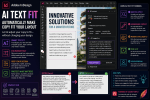
Adobe’s implementation includes different tones and a Fit Text capability designed to make generated content work within the available space.
This could be particularly useful for:
- advertisements
- brochures
- product catalogs
- newsletters
- social-media assets
- marketing collateral
- corporate reports
- magazine layouts
It doesn’t eliminate the need for professional writers or editors. Generated text still needs human review.
But it can reduce the amount of time designers spend repeatedly adjusting copy simply because it doesn’t fit the design.
3. Generate Text Changes the Placeholder-Text Workflow
Another interesting development is Generate Text.
For decades, designers have relied on placeholder text such as Lorem Ipsum when building layouts before the final copy becomes available.
AI changes that.
Instead of inserting meaningless placeholder text, designers can generate contextually relevant draft copy.
You can place the cursor inside a text frame, access Generate Text, describe the content you want and have InDesign produce text for the layout. Adobe says generated content can follow the paragraph styles or fonts already applied to the frame.
Imagine designing a travel magazine.
Instead of:
Lorem ipsum dolor sit amet…
you could request draft content describing a Mediterranean destination.
The generated copy gives you a much more realistic impression of how the finished page will look.
This is potentially valuable for mockups, prototypes, presentations and early-stage editorial design.
4. Text to Image Brings Firefly into the Layout
Generative AI isn’t limited to text.
Adobe has integrated Text to Image capabilities powered by Adobe Firefly into InDesign.
Designers can describe an image and generate visual variations without leaving the document.
For example, you might request an image such as:
Minimal modern office interior with natural lighting.
Firefly can generate possible images that can then be evaluated within the context of the actual page.
This is particularly useful during the concept and prototyping stages.
Instead of searching stock libraries just to populate an early mockup, designers can quickly generate visuals that represent the intended direction.
Adobe says Firefly’s generative capabilities in InDesign are designed to complement existing design workflows rather than replace InDesign’s traditional tools.
5. Generative Expand Helps Images Fit Your Layout
Every InDesign designer eventually encounters the same problem:
The perfect photograph doesn’t fit the frame.
Perhaps you have a horizontal image but need a vertical composition.
Or maybe you need more background above a subject to accommodate a headline.
Previously, solving this often meant opening the image in Photoshop, modifying the canvas and rebuilding the missing area.
Generative Expand provides another option.
Adobe Firefly can generate additional visual content beyond the original image boundaries, attempting to match elements such as the existing lighting, perspective and texture.
For publication designers, this can be extremely useful.
A photograph that doesn’t quite fit the layout may no longer require redesigning the entire page around the limitations of the original crop.
6. Generative Fill Adds Another Image-Editing Option
Adobe also lists Generative Fill as a beta capability within InDesign’s generative AI feature set.
This allows images to be modified using text prompts.
Potential operations include removing distracting elements, introducing new objects or replacing parts of an image while attempting to preserve the visual characteristics of the surrounding content.
Again, Photoshop remains the more sophisticated environment for detailed image manipulation.
But that’s not necessarily the point.
The benefit is workflow efficiency.
For relatively straightforward changes, designers increasingly have options without leaving their InDesign document.
7. Adobe Express Image Editing Comes Directly to InDesign
One of the most interesting non-AI workflow developments arrived with InDesign 21.3 in March 2026.
Adobe introduced tighter integration with Adobe Express image-editing tools.
Designers can refine images using Express editing capabilities while remaining within the broader InDesign workflow.
InDesign 21.4 subsequently improved the Save as New options for images edited using Express, providing more control over linked and embedded images.
This is another sign that Adobe wants Creative Cloud applications to work less like isolated products and more like interconnected services.
For everyday publishing work, that could mean fewer interruptions and less application switching.
8. Flex Layout Is Becoming Increasingly Important
One of the most significant structural changes in modern InDesign is Flex Layout.
Traditional InDesign layouts are heavily based around precisely positioned frames.
That approach is perfect for print.
Digital publishing introduces a different problem.
Content may need to respond to changing dimensions, text lengths or output environments.
Flex Layout introduces more adaptable relationships between layout elements.
Adobe expanded the feature in InDesign 21.3, including better handling of child elements. Designers can lock child elements to avoid accidental movement and make precise adjustments using the keyboard.
Version 21.4 brought further improvements aimed at making Flex Layout editing more intuitive.
This is worth watching carefully.
Flex Layout could become increasingly important as the distinction between print design and responsive digital publishing continues to narrow.
9. Accessibility Is Receiving Much More Attention
Accessibility is no longer an optional consideration for many publishing organizations.
Governments, educational institutions, corporations and publishers increasingly need digital documents that work effectively with assistive technologies.
Adobe has therefore been expanding InDesign’s accessibility capabilities.
One particularly interesting feature is AI-generated alt text.
InDesign can automatically generate alternative descriptions for placed images.
Designers can then review and edit those descriptions before publication.
This doesn’t remove the designer’s responsibility for checking accessibility.
AI-generated descriptions can be inaccurate or miss the purpose an image serves within a particular document.
But it can dramatically improve the starting point.
10. InDesign Can Detect Outdated Alt Text
InDesign 21.4 makes AI-generated alt text more practical.
Imagine placing a photograph and generating alt text describing the image.
You then crop the image substantially.
The original description might no longer accurately represent what the reader sees.
InDesign can now indicate when alt text may have become outdated after an image is cropped or repositioned.
The designer can then regenerate or manually update the description.
This is a relatively small feature from a visual-design perspective, but it’s an important workflow improvement for accessible publishing.
11. Better Accessible EPUB Publishing
Adobe has also improved accessibility for EPUB production.
InDesign 21.3 introduced improvements including accessible context breaks and accessible glossary export.
Context breaks can be defined and exported through paragraph styles, while glossary improvements help preserve meaningful structure and navigation when exporting reflowable EPUB content.
These features matter to anyone producing:
- ebooks
- educational publications
- training materials
- technical manuals
- academic publications
- government documents
Accessibility is becoming deeply integrated into the publishing process rather than being treated as something added at the end.
12. AI-Generated Alt Text Can React to Image Changes
One subtle but important characteristic of the new alt-text workflow is that InDesign doesn’t simply generate a description once and forget about it.
If an image is cropped or moved within its frame, InDesign can flag the existing description as potentially outdated.
The designer can regenerate the alt text based on the revised image.
This illustrates a broader trend in InDesign.
Adobe is beginning to make the application more content-aware.
Instead of merely storing objects and formatting information, InDesign increasingly understands something about the content being placed inside those objects.
13. AI Assistant Points Toward InDesign’s Future
One feature worth watching closely is AI Assistant.
Adobe currently lists AI Assistant as part of the generative AI capabilities associated with InDesign Beta.
This could ultimately be more significant than individual generative tools.
The long-term opportunity is an InDesign environment where designers interact with the application conversationally.
Instead of knowing every menu location, panel or command, future workflows could increasingly involve describing what you want to accomplish and allowing an assistant to help execute or explain the required steps.
The technology is still evolving, so it is important not to treat beta functionality as a finished production workflow.
Nevertheless, AI Assistant provides a strong indication of where Adobe is heading.
InDesign Is Becoming More Than a Page-Layout Application
For many years, Adobe InDesign could be summarized relatively simply:
It is the professional application for page layout and publishing.
That remains true.
But the definition is becoming incomplete.
InDesign in 2026 increasingly combines several capabilities:
Layout + publishing + AI + accessibility + image editing + responsive design + content generation.
That doesn’t mean traditional InDesign skills are becoming irrelevant.
Quite the opposite.
Typography, grids, styles, master/parent pages, color management, image preparation and publication structure remain fundamental professional skills.
AI doesn’t automatically create good editorial design.
But it can automate or accelerate some of the repetitive work surrounding it.
What Should Existing InDesign Users Learn First?
If you already know InDesign, you don’t need to relearn the application from scratch.
Instead, concentrate on the capabilities that can meaningfully change your workflow.
Start with Rewrite and Generate Text if you regularly work with marketing or editorial copy.
Explore Text to Image and Generative Expand if image sourcing and cropping frequently slow down your projects.
Learn Flex Layout if you create content destined for digital or adaptable layouts.
And if you publish PDFs or EPUBs, spend time understanding the latest accessibility and alt-text tools.
These are likely to provide more immediate value than trying every new feature simply because it exists.
Is Adobe InDesign Still Worth Learning in 2026?
Absolutely.
Tools such as Canva and Adobe Express have made everyday design considerably easier, while AI can now generate surprisingly sophisticated visual content.
But professional publishing involves much more than generating an attractive page.
Long documents, books, catalogs, reports, magazines and sophisticated branded publications require control over typography, styles, grids, pagination, cross-references, assets, accessibility and output.
That remains InDesign’s territory.
What is changing is the amount of assistance available to the designer.
InDesign is no longer evolving only through new layout commands. Adobe is introducing tools that help designers generate content, manipulate imagery, maintain accessibility and create more adaptable digital layouts.
Final Thoughts
Adobe InDesign 2026 represents an interesting transition point.
The application remains firmly rooted in professional publishing, but Adobe is layering new intelligence on top of that foundation.
The biggest developments aren’t simply individual features such as Rewrite, Generative Expand or automatic alt text.
The bigger story is how these technologies work together.
A designer can increasingly create copy, generate imagery, adjust images, build adaptable layouts, improve accessibility and prepare content for multiple publishing formats without constantly leaving InDesign.
For experienced users, that means some familiar workflows are worth reconsidering.
For new users, it means learning InDesign is no longer only about mastering page layout.
It is becoming about mastering an increasingly intelligent publishing environment.
And if Adobe’s current direction continues, AI-assisted publishing is likely to become an increasingly important part of the InDesign workflow over the next several releases.