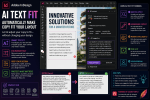
If you last used Adobe InDesign seriously in 2024, opening the latest version in 2026 may not initially feel revolutionary.
The familiar foundations are still there.
Pages. Text frames. Paragraph styles. Parent pages. Links. Preflight. Tables. PDF export.
But look more closely and something important has changed.
Adobe has spent the last two years expanding InDesign beyond traditional fixed-page desktop publishing. Artificial intelligence is entering writing and accessibility workflows. Flex Layout introduces a more adaptive approach to page construction. PDF conversion can help recover editable documents from finished PDFs. Adobe Express is becoming part of the production workflow, while cloud documents and online review are changing how designers collaborate.
So how different is InDesign in 2026 from the InDesign many designers were using in 2024?
And, more importantly:
Are the changes significant enough to affect your everyday workflow?
Let’s compare them.
InDesign 2024 Was Already a Mature Publishing Application
By 2024, InDesign was hardly missing fundamental page-layout capabilities.
It was already exceptionally powerful for:
- books
- magazines
- brochures
- catalogs
- annual reports
- advertisements
- interactive documents
- accessible PDFs
- EPUBs
- long-document publishing
Designers already had sophisticated typography, GREP, Data Merge, styles, tables, scripting, parent pages, preflight, packaging, and professional PDF output.
Adobe therefore didn’t need to reinvent page layout.
The challenge was different.
Publishing itself was changing.
Designers increasingly needed to work with AI, variable content, remote teams, accessibility requirements, cloud workflows, and multiple output channels.
Many of the changes between 2024 and 2026 address those broader production challenges.
1. AI Has Moved Much Closer to the Layout
Perhaps the most obvious difference is artificial intelligence.
In 2024, many designers already used generative AI—but often outside InDesign.
A workflow might look like:
InDesign → ChatGPT or another AI tool → Generate text → Copy → Return to InDesign → Paste
By 2026, Adobe is increasingly bringing AI-assisted capabilities closer to the document itself.
This changes AI from an external helper into part of the publishing workflow.
2. Generate Text Changes Placeholder Copy
Lorem Ipsum has served designers well for decades.
But placeholder text has a limitation: it doesn’t resemble the real editorial content.
A travel brochure filled with Latin doesn’t reveal whether realistic destination descriptions will fit.
AI-generated placeholder content can.
Instead of generic filler, designers can create text appropriate to the project.
For example:
Write a 60-word introduction for a premium sustainable travel brochure about Norway.
Now the prototype contains content with approximately the right:
- subject
- vocabulary
- tone
- sentence structure
- length
That makes early layout testing more realistic.
3. Rewrite Brings Editorial Assistance into InDesign
Another major development is AI-assisted rewriting.
Suppose a client provides this copy:
Our company provides many different innovative services that help customers with many different business requirements.
The problem isn’t layout.
The problem is writing.
Traditionally, you might send it back to the copywriter or edit it manually.
Modern AI-assisted workflows can help rewrite text for:
- clarity
- concision
- tone
- professionalism
- length
That doesn’t turn InDesign into a word processor.
It simply recognizes a reality of production design:
Designers constantly encounter copy that needs adjustment.
4. Text Can Become More Layout-Aware
One particularly interesting development is the relationship between AI and available space.
Overset text is one of the oldest InDesign problems.
A paragraph is too long.
The designer can enlarge the frame, reduce typography, or shorten the copy.
AI introduces another option:
adapt the wording to the space available.
This is strategically important.
InDesign traditionally adapted layout around content.
Modern workflows increasingly allow content and layout to adapt to each other.
5. Flex Layout Is a Much Bigger Change Than It Looks
If AI is the most visible change, Flex Layout may be the more fundamental design change.
Traditional InDesign layouts rely heavily on fixed coordinates.
Put the image here.
Put the heading there.
Position the description 8 mm below it.
Flex Layout introduces relationships.
Instead of saying:
Put this description at Y = 82 mm.
you can think:
Keep this description beneath the heading with consistent spacing.
That sounds like a small distinction.
It isn’t.
6. InDesign Is Beginning to Think More Like Responsive Design Software
Web designers have worked this way for years.
Responsive web design doesn’t assume that every element will always occupy one exact coordinate.
Instead, developers define relationships and constraints.
Flex Layout brings some of this philosophy into InDesign.
Elements can be organized according to properties such as:
- direction
- alignment
- spacing
- wrapping
- sizing
The result is a layout that can better tolerate changing content.
7. Variable Content Is Easier to Handle
Imagine a catalog containing 800 products.
Every card contains:
Image
Product name
Description
Price
One product name contains two words.
Another contains eleven.
One description is 35 words.
Another is 80.
Rigid layouts frequently need manual corrections.
Flex Layout can make those components more adaptable.
This is particularly important for automated publishing.
8. Multilingual Publishing Benefits Too
Translation frequently breaks layouts.
A short English heading may become considerably longer in German.
A button may become wider in Dutch.
A French paragraph may require another line.
Traditional fixed layouts often need manual localization adjustments.
Flexible components can absorb more of that variation.
For organizations producing publications in many languages, that can represent meaningful production savings.
9. PDF Conversion Solves an Old InDesign Problem
This is one of the most practically useful changes.
Imagine a client sends you:
Company_Brochure_2021.pdf
and says:
Can you update the addresses and prices?
You ask for the InDesign file.
They don’t have it.
In 2024, this could easily become a reconstruction job.
Modern InDesign can provide a much better starting point by converting PDF content into an editable InDesign document.
10. A PDF Can Become a Starting Point Instead of a Dead End
PDF conversion can potentially recover elements such as:
- editable text
- images
- page geometry
- graphic elements
- typography
- layout structure
It isn’t the same as recovering the original INDD file.
Some source-document intelligence may be gone permanently.
You may need to rebuild:
- styles
- parent pages
- threaded stories
- links
- tables
- complex effects
But the productivity difference can still be enormous.
Instead of starting with a blank page, you start with a reconstruction.
11. Legacy Document Modernization Becomes Easier
PDF conversion also enables an interesting new workflow.
Old PDF
↓
Convert to InDesign
↓
Recover content
↓
Clean document structure
↓
Add modern paragraph styles
↓
Introduce Flex Layout
↓
Improve accessibility
↓
Replace outdated images
↓
Export modern publication
You aren’t merely recovering an old document.
You’re using it as the foundation for a better one.
12. Adobe Express Is Closer to the InDesign Workflow
In 2024, many professional InDesign users primarily thought in terms of the classic trio:
InDesign + Photoshop + Illustrator
That remains extremely powerful.
But Adobe Express is becoming increasingly relevant.
Express provides a faster environment for everyday creative tasks and AI-assisted asset manipulation.
That means the modern workflow may increasingly look like:
InDesign + Photoshop + Illustrator + Adobe Express + Firefly
Each tool serves a different purpose.
13. Quick Image Work Requires Less Friction
Not every image correction requires a full Photoshop workflow.
Designers frequently need simple operations such as:
- remove a background
- crop an image
- resize an asset
- make a quick enhancement
- create another variation
Adobe Express can make these smaller jobs faster.
Photoshop remains the better choice for sophisticated retouching and professional pixel-level editing.
The change is about choosing the fastest appropriate tool.
14. Generative AI Changes Image Sourcing
A designer building a concept publication traditionally needed:
- client photography
- stock imagery
- temporary placeholders
Generative AI adds another option.
A designer can create conceptual imagery using Adobe’s Firefly ecosystem during the design process.
This can be especially useful for:
- mockups
- pitches
- prototypes
- early design exploration
- temporary placeholders
It doesn’t eliminate photography or illustration.
It expands the available creative toolkit.
15. Generative Expand Can Rescue Difficult Crops
Consider a common problem.
You have an excellent horizontal photograph.
The layout requires a vertical hero image.
In 2024, you might:
- crop heavily
- change the layout
- find another photograph
Generative expansion offers another possibility.
AI can create additional image area around the original photograph.
That can make an otherwise unsuitable image work within the composition.
Professional review remains essential, but the production possibilities are significant.
16. Accessibility Is More Central in 2026
Accessibility existed long before 2026.
What has changed is its importance within mainstream design workflows.
Organizations increasingly expect publications to work for people who:
- use screen readers
- enlarge text
- navigate with assistive technology
- need strong contrast
- depend on meaningful document structure
Accessibility is becoming part of the designer’s core professional responsibility.
17. AI Can Help with Alt Text
Writing alternative text for large image-heavy publications can be time-consuming.
AI-assisted alt-text generation provides a useful starting point.
Instead of describing every image entirely from scratch, designers can review and improve generated descriptions.
The human review step matters.
AI can identify what an image contains.
It may not understand why that image matters in the publication.
Good alt text depends on context.
18. EPUB Workflows Are Becoming More Accessibility-Aware
Reflowable EPUB is fundamentally different from fixed print design.
The reader can control:
- font size
- display size
- margins
- orientation
- sometimes fonts and colors
That means the publication must tolerate variation.
Adobe’s recent InDesign development increasingly reflects this requirement.
Designers need to think beyond:
Does this page look perfect on my screen?
and ask:
Does this content still work when the reader changes the experience?
That is a major conceptual shift.
19. Collaboration Is Less Dependent on PDF Attachments
InDesign’s traditional review cycle was simple but inefficient.
Export PDF.
Email PDF.
Receive comments.
Make corrections.
Export another PDF.
Repeat.
By 2026, browser-based review workflows can reduce much of this friction.
Share for Review allows stakeholders to review designs online without needing InDesign.
20. Comments Can Become Part of the InDesign Workflow
This is more important than it sounds.
A client comment can remain associated with the design rather than disappearing into an email chain.
Designers can manage review feedback from within the InDesign workflow.
They can:
- inspect comments
- reply
- make corrections
- resolve feedback
For a 100-page publication involving several stakeholders, centralized review can save substantial time.
21. One Review Link Can Replace Multiple Proofs
Instead of sending:
Annual_Report_v1.pdf
then:
Annual_Report_v2.pdf
then:
Annual_Report_v3.pdf
a shared review can be updated.
Reviewers return to the same destination.
This reduces one of the biggest dangers in creative production:
someone reviewing the wrong version.
22. Cloud Documents Change Where the Master File Lives
Traditional InDesign production asks:
Where is the master INDD file?
Perhaps it’s:
- on a workstation
- on a server
- in Dropbox
- in OneDrive
- on an external drive
Cloud documents introduce another model.
The cloud document itself becomes the working source.
This is particularly useful for distributed teams.
23. Version History Is More Integrated
Version control has traditionally depended on designers creating files such as:
Report_v14.indd
Report_v15.indd
Report_v16.indd
That approach still has value.
Cloud document history adds another layer.
Earlier document states can be available through the cloud workflow, making it easier to recover previous versions when necessary.
This isn’t a reason to abandon backups.
It is another recovery mechanism.
24. Editing and Reviewing Are Becoming Separate Roles
Modern collaboration also makes an important distinction:
Review access and editing access aren’t the same.
A client usually needs to comment.
Another designer may need to edit.
InDesign’s cloud collaboration capabilities increasingly support this distinction.
That’s a better model than simply giving everyone access to everything.
25. InDesign Is Becoming Part of a Larger Creative System
Perhaps the biggest difference between 2024 and 2026 isn’t one feature.
It is how the pieces connect.
Consider this workflow:
InDesign
Build the publication.
↓
AI
Generate or rewrite draft text.
↓
Firefly / Adobe Express
Create or modify supporting imagery.
↓
Flex Layout
Allow components to accommodate variable content.
↓
Accessibility tools
Improve the digital reading experience.
↓
Cloud collaboration
Collect stakeholder feedback.
↓
InDesign
Produce the final PDF, print publication, or EPUB.
InDesign is increasingly the center of a connected publishing workflow rather than an isolated desktop application.
InDesign 2024 vs 2026 at a Glance
| Workflow | InDesign 2024 Approach | InDesign 2026 Direction |
|---|---|---|
| Page layout | Primarily fixed | Fixed + flexible |
| Text creation | Primarily human/external tools | Increasing AI assistance |
| Text rewriting | Manual/external | AI-assisted |
| Variable content | Manual adjustment | Flex Layout |
| Lost source files | Rebuild/third-party workflow | PDF conversion |
| Quick image edits | Photoshop/external | Express-integrated workflows |
| Image generation | External workflow | Firefly ecosystem |
| Alt text | Primarily manual | AI-assisted |
| Review | PDF-centric | Browser/cloud review |
| Document storage | Primarily local/file based | Local + cloud |
| Collaboration | File exchange | Shared cloud workflows |
| Version recovery | Manual versions/backups | Cloud history + traditional methods |
| Publishing model | Desktop publishing | Connected publishing platform |
This is not a complete list of every InDesign change.
But it illustrates the larger transformation.
What Hasn’t Changed Since 2024?
Despite all these developments, the fundamentals remain remarkably stable.
You still need to understand typography.
You still need Paragraph Styles.
You still need Character Styles.
You still need Parent Pages.
You still need Object Styles.
You still need good grids.
You still need to understand image resolution.
You still need Preflight.
You still need to know how to create appropriate PDF output.
That is important.
Learning the latest AI features while ignoring fundamental InDesign skills would be a mistake.
Traditional Frames Aren’t Obsolete
Flex Layout does not mean every document should become responsive.
Imagine a magazine cover.
The relationship between the photograph, masthead, cover lines, and whitespace may be deliberately precise.
You don’t necessarily want those elements moving automatically.
Traditional frames remain ideal for highly art-directed work.
The real improvement is that designers now have another option.
Use:
fixed positioning when composition must remain exact
and:
Flex Layout when content needs to adapt.
Photoshop Isn’t Obsolete Either
Adobe Express and generative AI don’t eliminate Photoshop.
Photoshop remains vastly more capable for:
- advanced retouching
- masking
- compositing
- professional color work
- complex selections
- detailed image manipulation
Express is valuable because it can handle simpler jobs quickly.
A professional designer doesn’t need one tool.
They need the correct tool for each task.
Human Writers Aren’t Replaced by Generate Text
The same applies to AI writing.
Generate Text is useful for:
- prototypes
- draft descriptions
- placeholders
- variations
- short production copy
It doesn’t mean every publication should contain unedited AI-generated writing.
Professional editorial judgment remains essential.
AI accelerates drafting.
People remain responsible for accuracy, voice, context, and quality.
Does InDesign 2026 Make Designers Faster?
Potentially, yes.
But only if you adopt the features that solve actual workflow problems.
A designer who never creates variable layouts may gain little from Flex Layout.
A freelancer whose clients constantly send confusing PDF comments could gain considerably from Share for Review.
A catalog designer may benefit enormously from flexible components.
A book designer may care much more about accessibility and EPUB improvements.
A production designer inheriting old client documents may find PDF conversion transformative.
The value depends on your work.
Who Benefits Most from the Changes?
Freelance Designers
Useful improvements include:
- Share for Review
- PDF conversion
- quick Adobe Express edits
- AI writing assistance
These can reduce administrative and production overhead.
Agencies
Agencies can benefit from:
- centralized review
- cloud collaboration
- Adobe Projects
- reusable Flex Layout components
- faster creative variations
Publishers
Publishers should pay particular attention to:
- accessibility
- EPUB
- document recovery
- collaboration
- long-document workflows
Catalog Designers
Potentially high-value capabilities include:
- Flex Layout
- Data Merge
- automation
- AI-assisted copy
- PDF conversion
Corporate Design Teams
Useful developments include:
- cloud documents
- review workflows
- shared assets
- accessibility
- Adobe Express integration
Should You Upgrade from InDesign 2024?
If InDesign 2024 already handles everything you need and your existing production environment depends on specific plugins or tightly controlled workflows, upgrading simply because a newer version exists isn’t necessarily wise.
Professional production systems should always be tested before migration.
However, if your work increasingly involves:
- AI-assisted content
- variable layouts
- old PDFs without source files
- accessibility
- online reviews
- cloud collaboration
- Adobe Express
- digital publishing
the newer InDesign workflow offers substantially more.
The strongest argument for upgrading isn’t any single feature.
It is the combination.
Don’t Upgrade a Critical Workflow Blindly
Before moving a production environment from an older InDesign version, test:
- plugins
- scripts
- fonts
- templates
- linked assets
- PDF presets
- color workflows
- Data Merge
- EPUB exports
- automated publishing systems
Keep previous versions available where your Creative Cloud setup and organizational policies allow.
A new feature isn’t worth breaking a mission-critical publishing pipeline.
A Good Way to Learn the New InDesign
If you’re returning after using InDesign 2024, try learning the newer capabilities in this order.
1. Flex Layout
Create one simple responsive card.
2. Generate and Rewrite Text
Experiment with a small marketing document.
3. PDF Conversion
Test an old brochure PDF.
4. AI Alt Text
Try an image-heavy document.
5. Share for Review
Use it on a small client project.
6. Adobe Express Integration
Try a quick image-editing workflow.
7. Cloud Documents
Test collaboration before adopting it for major projects.
This gives you practical experience without disrupting your established workflow.
The Real Difference Between InDesign 2024 and 2026
InDesign 2024 was primarily an extraordinarily capable page-layout application connected to Creative Cloud.
InDesign in 2026 is increasingly something broader.
It is becoming an AI-assisted, adaptive, collaborative publishing environment.
The page still matters.
But Adobe is now paying much more attention to everything surrounding the page:
- where the content comes from
- how the content changes
- how layouts respond
- how images are created
- how documents are recovered
- how people review them
- how teams collaborate
- how readers access them
That is the real transformation.
Final Thoughts
If you compare InDesign 2024 and InDesign 2026 by looking only at the interface, you may conclude that relatively little has changed.
That would miss the bigger picture.
The most important changes are happening in the workflow.
AI is moving closer to text production.
Flex Layout is introducing responsive design principles.
PDF conversion is making legacy documents recoverable.
Adobe Express and Firefly are accelerating visual production.
Accessibility is becoming a mainstream design requirement.
Share for Review is reducing PDF-based feedback chaos.
Cloud documents are changing how teams access and version their work.
None of this eliminates traditional InDesign.
The application is still one of the most sophisticated tools available for typography and page layout.
Instead, Adobe is building new capabilities around that foundation.
For designers who last looked seriously at InDesign in 2024, the biggest reason to revisit it isn’t that Adobe has changed how you draw a text frame.
It’s that Adobe is changing what can happen before, during, and after that text frame becomes part of a publication.
And that makes the difference between InDesign 2024 and InDesign 2026 considerably more significant than a simple version-number change.