Every InDesign designer knows the problem.
The layout is finished.
The typography looks right.
The text frames are perfectly positioned.
Then the final copy arrives.
And it doesn’t fit.
A paragraph runs three lines too long. A product description overflows its card. A translated headline suddenly needs twice as much space. A client adds another sentence to a carefully designed callout.
Traditionally, fixing this meant changing the design or manually editing the copy.
Modern Adobe InDesign introduces another possibility: AI-assisted text fitting.
Instead of immediately shrinking the type or expanding the text frame, AI can help adapt the wording to fit the available space while attempting to preserve the original meaning.
For designers working with marketing materials, catalogs, advertisements, templates, multilingual documents, and variable content, this can significantly change the production workflow.
In this guide, we’ll examine how AI Text Fit works, when you should use it, when you shouldn’t, and why it could become particularly powerful when combined with Flex Layout.
What Is the Text-Fitting Problem?
InDesign layouts are constrained by space.
A text frame has a certain:
- width
- height
- column structure
- inset
- typography
The content must fit inside those constraints.
If it doesn’t, InDesign produces overset text.
The familiar red plus symbol appears on the text frame.
That tiny symbol can create a surprisingly large production problem.
The Traditional Ways to Fix Overset Text
Designers have always had several options.
You can enlarge the text frame.
You can reduce the font size.
You can decrease leading.
You can tighten tracking.
You can change paragraph spacing.
You can adjust the layout.
Or you can shorten the copy.
Each approach has consequences.
Why Shrinking the Font Isn’t Always the Answer
Perhaps the fastest solution is reducing the font size.
Your 10-point body copy doesn’t fit?
Make it 9.5 points.
Still doesn’t fit?
Try 9 points.
Technically, the problem disappears.
But you’ve changed the typography to accommodate an editorial problem.
Do this repeatedly throughout a publication and you can end up with inconsistent text sizes.
That’s rarely good design.
Tracking Can Only Go So Far
Another common trick is tightening tracking.
A small adjustment may solve a minor overflow.
But excessive negative tracking can damage readability.
Letters begin to feel cramped.
The paragraph looks visually denser.
The typography becomes less comfortable.
Again, you’re sacrificing design quality because the copy is too long.
Expanding the Frame Can Break the Layout
Sometimes the obvious solution is making the text frame larger.
That works—until something else is underneath it.
A longer description may push into:
- another text frame
- an image
- a button
- a footer
- another product card
One change begins a chain reaction.
This is particularly frustrating in tightly structured layouts.
Editing the Copy Is Often the Best Solution
Professional editors have always solved this problem elegantly.
Instead of damaging the typography, they rewrite the text.
For example:
Our innovative new software platform provides organizations with a comprehensive collection of powerful tools designed to help improve everyday productivity.
could become:
Our software platform provides powerful tools that improve everyday productivity.
The message remains.
The word count falls dramatically.
The problem is that not every designer has an editor sitting next to them.
AI changes that.
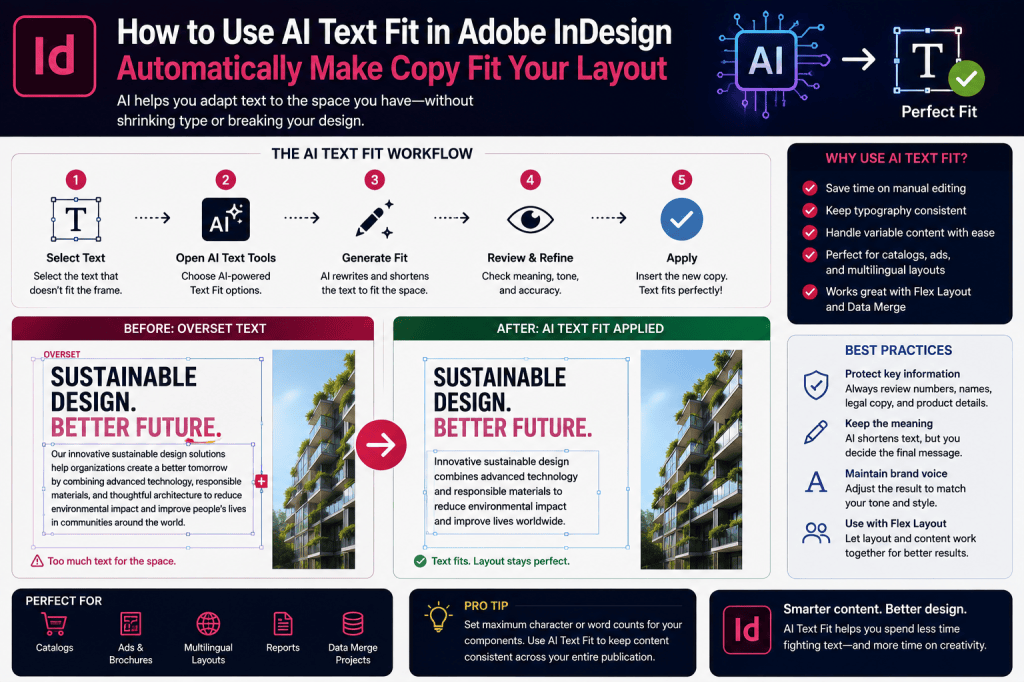
What Is AI Text Fit?
AI-assisted text fitting applies generative or rewriting technology to the content itself.
The basic concept is straightforward:
Original copy
↓
Available frame space analyzed
↓
AI rewrites or adjusts the text
↓
Shorter or modified copy is produced
↓
Content fits the layout more effectively
Instead of asking:
How can I squeeze this paragraph into the frame?
you can ask:
Can the paragraph communicate the same idea more concisely?
That is a fundamentally different solution.
Why This Matters
For decades, InDesign has primarily manipulated the container.
AI allows the application to help manipulate the content.
That means text and layout can begin responding to each other.
This is particularly significant for automated publishing.
How to Use AI Text Fitting in InDesign
The precise interface and availability can vary with the InDesign release and Adobe’s rollout of AI functionality, so check the options available in your installed version.
The general workflow is simple.
Step 1: Select the Text
Select the paragraph or text that needs to be adapted.
Before changing anything, read it carefully so you understand the intended meaning.
Step 2: Open the Available AI Text Controls
Use the relevant contextual or AI-assisted text options available in your version of InDesign.
Look for rewriting, shortening, or text-fitting functionality.
Step 3: Ask InDesign to Adapt the Copy
The AI analyzes the selected text and generates an alternative.
The goal is not simply deleting words.
A useful result should preserve the important information while reducing unnecessary language.
Step 4: Review the Result
This is essential.
Never assume that shorter automatically means correct.
Check:
- facts
- meaning
- names
- numbers
- dates
- terminology
- legal wording
- brand voice
Step 5: Check the Layout
Once the replacement copy is inserted, inspect the frame.
Does the text fit?
Does the paragraph still look balanced?
Has the rag improved or become worse?
Does the page still have the intended visual rhythm?
AI solves the editorial problem.
The designer still evaluates the typography.
Example: Product Description
Imagine this original description:
The Aurora Professional Office Chair has been carefully designed to provide outstanding ergonomic comfort throughout long working days and includes adjustable lumbar support, flexible armrests, and a breathable mesh back.
Suppose the product card doesn’t have enough room.
A shorter version might become:
The Aurora Professional Office Chair provides all-day ergonomic comfort with adjustable lumbar support, flexible armrests, and a breathable mesh back.
Much of the meaning remains.
But the text occupies less space.
For a catalog containing hundreds of products, this type of assistance can become extremely useful.
Example: Marketing Callout
Original:
Discover how our innovative cloud platform can help your organization improve productivity, simplify collaboration, and enable employees to work more effectively from virtually anywhere.
Shortened:
Improve productivity and collaboration with a cloud platform that helps employees work effectively from anywhere.
Same core message.
Much tighter copy.
Example: Headline
Imagine a layout designed for:
Smarter Publishing
The client changes it to:
Build Smarter and More Efficient Digital Publishing Workflows
The new headline may destroy the composition.
AI-assisted rewriting could suggest:
Smarter Digital Publishing
or:
Build Smarter Publishing Workflows
The designer can choose the alternative that best preserves both meaning and visual impact.
AI Text Fit Is Especially Useful for Catalogs
Catalog production is one of the clearest applications.
Product descriptions rarely arrive at identical lengths.
One contains 30 words.
Another contains 75.
Another contains 120.
Yet the product cards may need to remain visually consistent.
Traditionally, production designers spend significant time adjusting these differences.
AI can help normalize content length.
AI Text Fit and Data Merge
This becomes even more interesting when combined with Data Merge.
Imagine generating 2,000 product cards from a database.
Each record contains:
- product name
- category
- description
- specifications
- price
The database content varies significantly.
A traditional Data Merge workflow may produce dozens of overset frames.
An intelligent content-adaptation layer could eventually help reduce these exceptions.
This points toward a much more automated publishing model.
AI Text Fit and Flex Layout
This may be the most powerful combination.
Flex Layout helps the layout adapt to the content.
AI Text Fit helps the content adapt to the layout.
Put them together:
Variable content
↓
Flex Layout adapts structure
↓
AI adapts excessive copy
↓
Component remains within acceptable limits
That creates a much more resilient template.
Imagine a Product Card
The component contains:
Image
↓
Product Name
↓
Description
↓
Price
↓
Button
Flex Layout manages the relationships between those elements.
If the product description becomes slightly longer, the card can expand.
But what happens when the description becomes three times longer?
You may not want the card to expand indefinitely.
AI-assisted fitting can shorten excessive copy.
Now both systems cooperate.
Why This Matters for Template Design
Traditional templates are often designed around ideal content.
Real content is rarely ideal.
It contains:
- unexpectedly long names
- missing information
- verbose descriptions
- translations
- inconsistent editorial styles
The more automated a publication becomes, the more important it is that templates survive imperfect content.
AI Text Fit can become another tool for making templates robust.
Multilingual Publishing
Translation is another strong use case.
Different languages require different amounts of space.
An English button might say:
Buy Now
The German equivalent may be longer.
Headlines, descriptions, captions, and interface-style elements can expand considerably after translation.
AI-assisted editing can potentially help shorten translated copy while preserving its meaning.
However, this requires particularly careful review.
Don’t Let AI Rewrite a Language You Can’t Verify
Suppose you’re producing a Japanese edition but don’t speak Japanese.
AI generates a shorter Japanese paragraph.
It fits beautifully.
That doesn’t mean it is correct.
A qualified speaker should verify:
- meaning
- grammar
- terminology
- cultural appropriateness
Layout efficiency must never replace editorial quality.
Accessibility Considerations
Text fitting should also respect accessibility.
Shrinking fonts excessively to make content fit can harm readability.
AI-assisted shortening may sometimes be a better option because it allows designers to preserve:
- readable type sizes
- appropriate leading
- comfortable spacing
However, simplified text should still communicate all essential information.
Accessibility isn’t about making text short.
It’s about making content usable.
Legal and Regulatory Copy
There are situations where you should be extremely cautious.
Do not casually allow AI to shorten:
- legal disclaimers
- safety warnings
- medical information
- financial disclosures
- contractual terms
- regulatory statements
A single removed phrase may alter the legal meaning.
For these materials, text changes should be approved by the appropriate subject-matter expert.
The layout should usually adapt to mandatory wording—not the other way around.
Numbers Need Special Attention
AI-generated rewriting can accidentally change numerical information.
Always check:
- prices
- percentages
- dates
- measurements
- product numbers
- telephone numbers
- statistics
If the original says:
Up to 35%
and the rewritten copy says:
35%
the meaning has changed.
Small editorial differences can create significant factual errors.
Product Names Should Remain Exact
AI may sometimes simplify wording that shouldn’t be simplified.
For example:
Adobe InDesign 2026 Professional Publishing Workflow
should not casually become:
Adobe Publishing Tool
if the official product name matters.
Protect:
- trademarks
- model numbers
- official product names
- technical terminology
Accuracy takes priority over fitting.
Brand Voice Matters
A technically correct rewrite may still be wrong for the brand.
A luxury brand might prefer:
Crafted for exceptional comfort.
A technical company might prefer:
Engineered for continuous ergonomic support.
A youth-oriented brand might use completely different language.
AI can shorten all three.
But the designer or copywriter needs to ensure the result still sounds like the organization.
Don’t Optimize Every Frame Individually
Another potential mistake is using AI separately on hundreds of paragraphs without editorial consistency.
You may end up with:
- different tones
- inconsistent terminology
- repeated phrases
- uneven writing quality
For large projects, establish editorial rules first.
Define:
- tone
- preferred terminology
- maximum description length
- prohibited wording
- mandatory information
Then use AI within those constraints.
Use Character Counts in Templates
A smart production workflow starts before the content arrives.
If a product card works best with approximately 250 characters, document that requirement.
Your content specification might say:
Product Name: Maximum 45 characters
Short Description: 180–250 characters
Feature Line: Maximum 70 characters
AI can then help adapt incoming content toward those targets.
This is much better than fixing random overset text after the entire catalog has been generated.
AI Should Support Editorial Governance
The strongest use of AI isn’t uncontrolled rewriting.
It is controlled assistance.
For example:
Editorial rule:
Descriptions should contain 40–55 words.
Incoming content:
92 words.
AI task:
Reduce to approximately 50 words while preserving specifications and product benefits.
Human review:
Approve or correct.
That creates a repeatable production process.
What About Very Short Text?
AI can also potentially help when content is too short.
Imagine a promotional card designed for approximately three lines of copy.
The supplied text contains four words.
The layout feels empty.
AI can help expand the message.
But be careful.
Expanding copy increases the risk of inventing unsupported claims.
Never allow AI to manufacture product benefits, specifications, or factual statements simply to fill space.
Fit the Design or Fit the Content?
This is the key judgment designers need to make.
Sometimes the copy should change.
Sometimes the layout should change.
Ask:
Is the content unnecessarily verbose?
Shorten it.
Is every word required?
Adapt the layout.
Is the typography too large for the component?
Review the design system.
Is the frame unusually small?
Increase it.
Is the content highly variable?
Consider Flex Layout.
AI Text Fit is one tool among several.
AI Text Fit vs Auto-Size
These features solve different problems.
Auto-Size
Changes the text frame to accommodate the content.
AI Text Fit
Changes or rewrites the content to better fit the available frame.
Consider the difference:
Auto-Size
Content stays fixed.
Container changes.
AI Text Fit
Container stays relatively fixed.
Content changes.
Flex Layout
Relationships between containers adapt.
Used together, these approaches provide designers with considerably more flexibility.
A Modern InDesign Fitting Strategy
Instead of immediately reducing font size, try this order:
1. Check the copy
Is unnecessary wording causing the problem?
2. Check the frame
Can it safely grow?
3. Check Flex Layout
Can surrounding elements adapt?
4. Check AI-assisted shortening
Can the message be expressed more efficiently?
5. Review typography
Only then consider small typographic adjustments.
This protects the design system.
Don’t Destroy Your Style System
One of the worst production habits is solving every overset frame with local formatting.
One paragraph becomes 9.8 pt.
Another becomes 9.5 pt.
Another gets -15 tracking.
Another gets different leading.
Eventually, the publication becomes typographically inconsistent.
Styles exist to prevent this.
AI-assisted content adaptation gives you another way to solve fitting problems without breaking the style system.
AI Text Fit for Advertisements
Advertisements have extremely strict spatial constraints.
A half-page advertisement cannot suddenly become taller because the client added another paragraph.
The dimensions are fixed.
AI-assisted rewriting can therefore be useful for producing concise alternatives.
Again, the advertiser should approve any substantive wording changes.
AI Text Fit for Social and Campaign Variations
A campaign may need:
- A4 brochure
- half-page advertisement
- LinkedIn graphic
- Instagram post
- email banner
- presentation slide
The same message won’t fit every format.
AI can help generate shorter versions for smaller layouts.
Combined with Adobe Express, this becomes an interesting multi-channel publishing workflow.
AI Text Fit for Annual Reports
Annual reports often contain small structured elements such as:
- executive summaries
- KPI cards
- statistic callouts
- chart captions
- employee profiles
These components benefit from consistent content length.
AI can help editors create concise versions while designers maintain visual consistency.
AI Text Fit for Responsive Publishing
Responsive publishing changes the traditional assumption that one piece of text always appears in one fixed space.
Different formats may require different content lengths.
For example:
Print brochure
120-word description.
Tablet layout
80 words.
Mobile promotional card
35 words.
AI can help create controlled content variants.
This moves InDesign toward a broader multi-format publishing workflow.
The Designer Still Makes the Decision
AI can suggest.
It can rewrite.
It can shorten.
It can generate alternatives.
But it doesn’t understand every strategic decision behind the page.
It doesn’t necessarily know:
- which sentence the client considers essential
- which technical term is legally required
- which phrase defines the brand
- which statistic drives the campaign
The designer and editor remain responsible.
A Professional AI Text Fit Workflow
For important publications, use a controlled process.
Step 1 — Preserve the original copy
Never lose the source text.
Step 2 — Identify the fitting problem
Determine how much reduction is actually necessary.
Step 3 — Generate an alternative
Use AI-assisted rewriting or fitting.
Step 4 — Compare original and rewritten versions
Look for lost meaning.
Step 5 — Verify factual information
Especially numbers, names, and technical claims.
Step 6 — Review the typography
Check line breaks, rag, spacing, and hierarchy.
Step 7 — Obtain approval when required
Particularly for client, legal, technical, or regulated copy.
This turns AI into a production assistant rather than an uncontrolled editor.
When Not to Use AI Text Fit
Avoid automated rewriting when:
- every word is legally required
- wording has already received formal approval
- technical accuracy is critical
- quotations must remain verbatim
- text contains sensitive contractual language
- the content is already extremely concise
Sometimes overset text is telling you something important:
the layout needs to change.
Listen to it.
The Bigger Change Behind AI Text Fit
AI Text Fit may appear to be a small productivity feature.
But conceptually, it represents something much larger.
Traditional publishing worked like this:
Content arrives
↓
Designer creates layout
↓
Layout adapts to content
Modern AI-assisted publishing can work more dynamically:
Content arrives
↓
Layout interprets content
↓
Flex Layout adapts
↓
AI adapts content where appropriate
↓
Designer reviews
↓
Publication stabilizes
Content and design begin working as a system.
From Fixed Templates to Intelligent Templates
This is where the technology becomes especially interesting.
Imagine an InDesign template that understands:
- preferred text lengths
- flexible spacing
- minimum and maximum component sizes
- image behavior
- content hierarchy
Now combine that with AI capable of adapting content.
Instead of constantly repairing exceptions manually, designers can create templates designed to absorb variation.
That could transform high-volume publishing.
What This Means for InDesign Designers
AI isn’t eliminating the designer.
It is changing where designers spend their time.
Less time:
- squeezing paragraphs
- adjusting random tracking
- rewriting repetitive descriptions
- fixing minor overflow
More time:
- designing systems
- establishing typography
- defining content rules
- reviewing quality
- making creative decisions
That is a much better use of professional design expertise.
Final Thoughts
Overset text has existed for as long as digital page layout.
Until recently, the solutions were almost entirely manual.
Make the frame bigger.
Make the type smaller.
Tighten the tracking.
Change the layout.
Edit the copy.
AI-assisted text fitting adds another option.
Make the copy smarter.
When used carefully, it can help preserve typography, reduce manual editing, and make templates more resilient to variable content.
Its real power becomes apparent when combined with other modern InDesign capabilities.
Flex Layout lets the design adapt to content.
AI Text Fit lets content adapt to design.
Data Merge supplies variable information.
Adobe Express and Firefly help adapt visual assets.
Cloud collaboration helps teams review the result.
Together, these technologies point toward a different kind of InDesign workflow—one based less on repeatedly fixing individual pages and more on creating intelligent publishing systems.
AI Text Fit shouldn’t make editorial decisions for you.
It shouldn’t rewrite legally sensitive information without review.
And it shouldn’t be used to hide fundamentally bad layout decisions.
But for the thousands of small text-fitting problems designers encounter every year, it can become an extremely useful production assistant.
The red overset-text symbol isn’t disappearing.
But in 2026, designers have considerably smarter ways to deal with it.