Creating mathematical content in Adobe InDesign has traditionally been more difficult than creating ordinary text.
InDesign is excellent at typography, page layout, tables, long documents, and professional publishing. But designers producing textbooks, scientific publications, technical manuals, academic journals, engineering documents, and educational materials often need something more specialized:
properly formatted mathematical equations.
For years, many InDesign users depended on external equation editors, specialized plugins, imported graphics, or carefully constructed combinations of text and symbols.
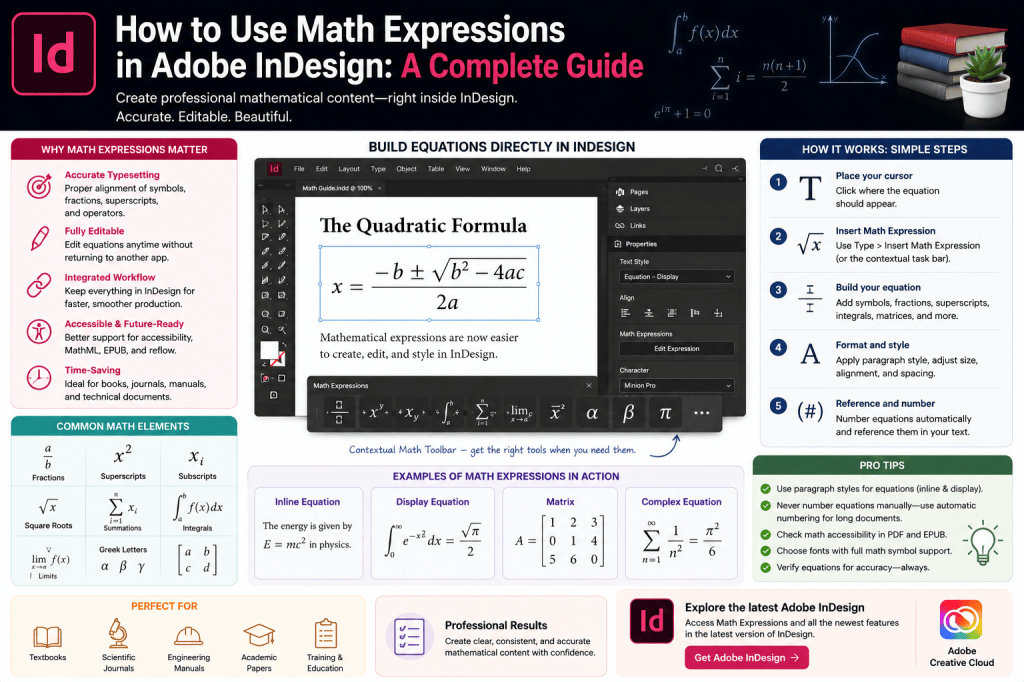
Adobe’s newer Math Expressions capabilities are designed to make mathematical publishing more integrated with the InDesign workflow.
Instead of treating every equation as an external graphic, designers can work with mathematical expressions more directly inside their publications.
For educational and technical publishers, this can be a significant workflow improvement.
This guide explains how mathematical expressions fit into modern InDesign workflows, where they are useful, what designers should check carefully, and how they can improve the production of technical publications.
Why Math Has Always Been Difficult in Page-Layout Software
Consider a simple equation:
x² + y² = z²
That isn’t particularly difficult to reproduce.
Now consider:
x = (-b ± √(b² – 4ac)) / 2a
Things become more complicated.
And professional scientific publications may contain:
- fractions
- exponents
- subscripts
- matrices
- integrals
- summations
- Greek characters
- limits
- vectors
- nested equations
Trying to construct these manually from ordinary text objects quickly becomes inefficient.
Traditional Ways to Create Equations in InDesign
Historically, designers have used several approaches.
Manual Typography
For very simple equations, designers could use regular InDesign text.
Superscript and subscript formatting could handle basic expressions.
For example:
E = mc²
This works well enough for simple mathematics.
But it becomes difficult for complex equations.
External Equation Editors
Another approach has been to create equations in specialized mathematical software.
The equation is then exported and placed into InDesign.
This can produce excellent results.
But it creates a fragmented workflow:
InDesign
↓
External equation application
↓
Create equation
↓
Export
↓
Return to InDesign
↓
Place equation
If the equation changes, the process repeats.
For documents containing hundreds of equations, this can become cumbersome.
Equation Plugins
Professional publishers have also relied on specialized InDesign plugins.
These tools can provide sophisticated mathematical typesetting and remain valuable for complex publishing environments.
However, plugins introduce additional considerations:
- licensing
- compatibility
- training
- version support
- production dependencies
Native mathematical capabilities can therefore simplify many workflows.
What Are Math Expressions in Modern InDesign?
Adobe’s modern Math Expressions functionality allows mathematical notation to become more integrated with InDesign.
Rather than treating mathematics purely as manually formatted text or external artwork, designers can work with structured mathematical expressions.
This makes InDesign more suitable for publications containing technical and educational content.
Typical use cases include:
- textbooks
- workbooks
- academic journals
- research papers
- engineering manuals
- scientific reports
- training materials
- examination papers
- technical documentation
For publishers working in these markets, equation support is far more than a niche feature.
Why Native Math Support Matters
Imagine a mathematics textbook containing 2,000 equations.
If every equation is an external graphic, you may need to manage thousands of additional assets.
Each equation may require:
- file naming
- storage
- linking
- updating
- version management
Integrated mathematical expressions can simplify this dramatically.
The equation becomes part of the document workflow rather than an external production dependency.
Creating a Math Expression
The exact controls available depend on the InDesign version you’re using, but the general workflow involves creating or inserting a mathematical expression within the document.
Start by placing your cursor where the equation should appear.
Use the available math-expression functionality to create the equation.
Enter the mathematical notation.
Then format and position the resulting expression appropriately within your layout.
For first-time users, begin with a simple equation before attempting complex mathematical structures.
Start with Simple Equations
Try something straightforward such as:
a² + b² = c²
This allows you to understand:
- how the expression is created
- how it behaves in text
- how it aligns
- how it responds to surrounding typography
Once you’re comfortable with the basic workflow, move to more complicated notation.
Fractions
Fractions are one of the first areas where proper mathematical typesetting becomes noticeably better than ordinary text.
Writing:
1/2
isn’t the same typographically as displaying a properly constructed fraction.
Scientific and educational publishing often requires numerator and denominator relationships to be visually clear.
Proper math-expression handling provides a more professional result.
Superscripts and Exponents
Exponents occur constantly in mathematical and scientific publications.
Examples include:
x²
10³
eˣ
While InDesign can already produce superscript text, structured mathematical expressions become increasingly valuable when exponents are part of larger formulas.
Subscripts
Subscripts are equally important.
For example:
H₂O
or mathematical variables such as:
x₁, x₂, x₃
Again, ordinary typography can handle simple cases.
But structured expressions become much more useful as complexity increases.
Square Roots
Expressions involving roots demonstrate why equation-specific functionality matters.
A mathematical radical isn’t simply a square-root character placed before some text.
The radical may need to extend across an entire expression.
For example:
√(x² + y²)
Proper mathematical typesetting ensures that the structure remains visually coherent.
Summations
Scientific and statistical publications frequently use summation notation.
For example:
Σx
More complex expressions may include upper and lower limits.
The positioning of those elements needs to follow mathematical conventions rather than ordinary text formatting.
This is where structured math support becomes increasingly important.
Integrals
Integrals present similar challenges.
A professional mathematical expression may need:
- integral symbol
- upper limit
- lower limit
- function
- differential notation
Building this manually from multiple text objects is possible.
But it is hardly efficient.
Native equation handling provides a much cleaner production model.
Greek Characters
Technical documents frequently use Greek characters such as:
- alpha
- beta
- gamma
- delta
- theta
- lambda
- sigma
- omega
InDesign has long supported Unicode characters and appropriate fonts.
Math expressions make it easier to use these symbols as part of structured formulas.
Equations Inside Paragraphs
Not every equation needs its own line.
Technical writing frequently contains inline expressions.
For example:
The relationship is defined by E = mc², where E represents energy.
Inline equations need to align naturally with the surrounding text.
Their baseline, size, and spacing should feel like part of the sentence.
This is an important area to inspect carefully.
Display Equations
Longer equations are usually easier to read when separated from body text.
For example:
F = G(m₁m₂/r²)
A display equation may be:
- centered
- given additional space above
- given additional space below
- numbered
Using consistent formatting is important, especially in books and academic publications.
Create a Paragraph Style for Equations
Don’t manually format every displayed equation.
Create a dedicated Paragraph Style.
For example:
Equation – Display
The style might control:
- alignment
- spacing above
- spacing below
- indents
- keep options
This creates consistency throughout the document.
Create Styles for Equation Numbers
Academic and scientific publications often number equations.
For example:
E = mc² (1)
Equation numbering should be systematic.
Don’t type every number manually if the publication contains many equations.
Use InDesign’s numbering and style capabilities wherever appropriate.
That makes inserting or deleting equations much easier later.
Why Automatic Numbering Matters
Imagine a 300-page textbook containing 600 numbered equations.
The author inserts a new equation near the beginning.
If equation numbers were entered manually, hundreds of references might become incorrect.
Structured numbering helps prevent this.
Professional long-document publishing depends on automation.
Cross-References to Equations
Technical publications frequently contain sentences such as:
As shown in Equation 17…
If equation numbers change, these references must change too.
InDesign’s cross-reference capabilities can help create a more maintainable publication.
Whenever possible, connect equation references structurally instead of typing them manually.
Math Expressions and Long Documents
Equation support becomes particularly valuable in long-document production.
Consider a university physics textbook.
It might contain:
- 600 pages
- 18 chapters
- 1,500 equations
- 300 figures
- 150 tables
- thousands of cross-references
Manual production becomes extremely risky at that scale.
The more structure you can build into the document, the more reliable the publication becomes.
Math Expressions and InDesign Books
InDesign’s Book functionality can organize large publications into separate chapter files.
Math-heavy textbooks can benefit from combining:
Book files
Paragraph Styles
Character Styles
Automatic numbering
Cross-references
Math Expressions
This produces a much more scalable technical publishing system.
Typography Still Matters
A mathematically correct equation can still look bad.
Designers need to pay attention to:
- symbol size
- spacing
- baseline alignment
- line weight
- relationship to body text
- surrounding whitespace
Mathematical typography has its own visual conventions.
Don’t treat equations as merely technical content.
They are part of the page design.
Choose Appropriate Fonts
Font selection matters enormously.
Not every typeface contains the mathematical symbols required for technical publishing.
A document may need extensive Unicode math coverage.
Test the typeface before committing an entire publication to it.
Look specifically at:
- Greek symbols
- operators
- arrows
- mathematical relations
- radicals
- brackets
- special characters
Missing glyphs discovered late in production can create major problems.
Match Math Typography with Body Typography
Equations should feel visually compatible with the rest of the publication.
If your body text is elegant and traditional but your equations look like they came from an unrelated software application, the page can feel inconsistent.
Consider:
- x-height
- stroke weight
- serif style
- character proportions
- overall visual tone
Good technical publishing requires both mathematical correctness and typographic coherence.
Don’t Manually Position Every Symbol
A common mistake is constructing complex equations using separate text frames.
For example:
one frame for the numerator,
one for the fraction line,
one for the denominator,
another for the exponent.
This creates fragile artwork.
Move one object and the equation breaks.
Structured mathematical expressions are far more maintainable.
Math and Accessibility
Accessibility is especially important in educational publishing.
A visually perfect equation isn’t necessarily accessible to someone using assistive technology.
Mathematical content needs meaningful structure so that assistive technologies can interpret it appropriately.
This is particularly relevant for:
- EPUB
- accessible PDF
- digital textbooks
- online learning materials
Designers should test mathematical output in the final delivery format rather than assuming visual correctness equals accessibility.
MathML and Accessible Mathematics
MathML is a markup language designed to represent mathematical notation structurally.
Conceptually, this is important because an equation shouldn’t merely be an image that looks like mathematics.
Ideally, digital systems should understand that it is mathematics.
Structured math can improve:
- accessibility
- reflow
- interoperability
- semantic meaning
For digital educational publishing, this is a major consideration.
EPUB and Mathematical Content
EPUB creates additional challenges because content must work across different reading environments.
Readers may:
- enlarge text
- change fonts
- rotate devices
- use screen readers
- use different EPUB applications
A fixed image of an equation may not respond well to those conditions.
Structured mathematical content can provide a better foundation for responsive digital publishing.
Always test the exported EPUB in multiple readers.
Math Expressions and Responsive Design
Mathematical expressions can also create layout problems when the available width changes.
A long equation that fits perfectly on an A4 textbook page may not fit on a small tablet screen.
Designers need to consider:
- line breaking
- equation width
- display vs inline math
- responsive behavior
This is another example of why modern publishing increasingly requires adaptable content.
Math Expressions and Flex Layout
Flex Layout may also become relevant when mathematical content appears inside reusable educational components.
Imagine a learning card containing:
Concept title
↓
Explanation
↓
Equation
↓
Example
↓
Exercise
Different equations require different amounts of space.
A flexible component can help accommodate these variations.
This combines structured content with adaptable layout.
Math Expressions and AI
AI also introduces interesting possibilities for mathematical publishing.
AI can potentially assist authors with:
- explaining equations
- generating examples
- creating practice problems
- producing alternative explanations
- generating draft educational content
However, mathematical accuracy is critical.
AI-generated equations should always be verified by someone qualified to evaluate them.
A beautifully formatted incorrect equation is still incorrect.
Never Trust AI Mathematics Without Verification
This deserves special emphasis.
Generative AI can produce plausible-looking mathematics that contains subtle errors.
Possible problems include:
- incorrect signs
- missing terms
- invalid transformations
- incorrect units
- faulty assumptions
If you’re publishing educational, scientific, engineering, or financial content, every equation should be checked.
InDesign handles presentation.
Subject-matter experts remain responsible for correctness.
Importing Equations from Authors
Authors may provide equations in many formats.
You might receive:
- Word documents
- LaTeX
- MathML
- screenshots
- PDFs
- handwritten notes
- external equation files
Establish a production standard before beginning a large project.
Decide:
- which format authors should submit
- how equations will be converted
- how they will be numbered
- how they will be styled
- how corrections will be handled
Consistency at intake saves enormous amounts of production time.
Don’t Use Screenshots of Equations
Screenshots are one of the worst long-term solutions.
They may:
- look blurry
- scale poorly
- be inaccessible
- have inconsistent backgrounds
- contain incorrect typography
- be difficult to edit
Whenever possible, use structured or vector-based mathematical content.
When External Equation Tools Still Make Sense
Native InDesign math functionality doesn’t necessarily eliminate specialized equation software.
External tools may remain preferable when:
- equations are extremely complex
- the publisher has an established LaTeX workflow
- specialized notation is required
- automated conversion pipelines already exist
- journal standards mandate particular formats
The goal isn’t to force every equation into one workflow.
It is to choose the most efficient and reliable production system.
A Professional Math Publishing Workflow
For a substantial educational or scientific publication, consider this process.
Step 1 — Establish the equation standard
Determine accepted source formats.
Step 2 — Choose appropriate fonts
Verify required mathematical glyph coverage.
Step 3 — Define equation styles
Create styles for inline and display mathematics.
Step 4 — Establish numbering
Automate equation numbering wherever possible.
Step 5 — Build cross-references
Avoid manually typed references.
Step 6 — Insert or create equations
Use the appropriate structured workflow.
Step 7 — Verify mathematical accuracy
Have a qualified reviewer check the content.
Step 8 — Check typography
Review spacing, alignment, and visual consistency.
Step 9 — Test accessibility
Especially for PDF and EPUB.
Step 10 — Test final output
Inspect equations in the actual publication format.
This produces a much safer workflow than treating every equation as isolated artwork.
Common Mistake: Focusing Only on Appearance
Designers naturally focus on visual quality.
But mathematical publishing requires three different kinds of correctness:
Mathematical correctness
Is the equation true?
Typographic correctness
Is the notation presented according to accepted conventions?
Technical correctness
Will the equation survive export and remain usable in the final format?
All three matter.
Common Mistake: Manual Equation Numbering
Avoid typing:
(1)
(2)
(3)
manually throughout a long publication.
One inserted equation can destroy the sequence.
Automate whenever possible.
Common Mistake: Ignoring Accessibility Until Export
Accessibility should be considered while constructing the document.
Waiting until the final PDF or EPUB is exported can make problems much harder to repair.
Build semantic structure from the beginning.
Common Mistake: Mixing Equation Styles
If one equation is centered, another is left aligned, another uses different spacing, and another uses a different font, the publication quickly looks amateurish.
Create a system.
Then use it consistently.
Where Math Expressions Are Most Valuable
Native math capabilities can be particularly valuable for:
Educational Publishers
Textbooks, exercises, and workbooks.
Universities
Research reports and teaching materials.
Scientific Publishers
Journals and technical publications.
Engineering Companies
Technical manuals and calculations.
Financial Organizations
Reports containing formulas and analytical models.
Training Companies
STEM learning materials and certification guides.
These markets often produce documents containing hundreds or thousands of equations.
Why This Matters for InDesign’s Future
Math Expressions may appear unrelated to AI, Flex Layout, or cloud collaboration.
But they fit into the same broader transformation.
Adobe is making InDesign capable of handling more content types directly.
Consider recent developments:
AI writing
Handles textual content.
AI alt text
Supports accessible imagery.
PDF conversion
Recovers legacy documents.
Flex Layout
Handles variable structures.
Cloud collaboration
Connects production teams.
Math Expressions
Handle structured technical content.
InDesign is expanding from page composition toward richer publishing systems.
From Page Layout to Structured Publishing
Traditional desktop publishing focused heavily on appearance.
Modern publishing increasingly requires both:
Appearance
and
Structure
A heading shouldn’t simply look like a heading.
It should be structurally identified as one.
A table shouldn’t merely look like a table.
Its rows and columns should have meaning.
An equation shouldn’t merely look mathematical.
It should ideally retain mathematical structure.
This is particularly important for accessible and digital publishing.
Is Native Math Worth Learning?
If you primarily create posters and marketing brochures, perhaps not immediately.
But if you work with:
- education
- science
- engineering
- academia
- technical documentation
then mathematical publishing deserves serious attention.
Even occasional equations can benefit from a cleaner native workflow.
For equation-heavy publications, the productivity impact can be substantial.
Final Thoughts
Mathematics has historically been one of the more awkward content types to handle in page-layout applications.
Simple equations were manageable.
Complex mathematical publishing often required external tools, plugins, imported graphics, or carefully constructed workarounds.
Modern Adobe InDesign is moving toward a more integrated approach.
Math Expressions give designers a better foundation for creating publications containing equations while maintaining the typographic precision InDesign is known for.
The biggest benefit isn’t simply that equations can look better.
It is that mathematics can become a more structured part of the publishing workflow.
That matters for:
- editing
- consistency
- numbering
- cross-referencing
- accessibility
- EPUB
- long-document production
- technical publishing
For designers producing scientific and educational content, this is an important development.
And when combined with InDesign’s other recent advances—Flex Layout, accessibility improvements, AI-assisted content, cloud collaboration, and improved digital publishing—it reinforces a larger trend.
InDesign is no longer evolving only as a tool for arranging text and pictures on pages.
It is becoming a platform for managing increasingly complex, structured, adaptable content.
For mathematical and technical publishers, that evolution could make a very real difference.